Notetaker joins meetings as a guest. If the meeting has a waiting room, or is limited to people in the organization, somebody has to let it in. When nobody does within 10 minutes of the join time it gives up, and without a notice the host finds out when they look for a recording that doesn’t exist.
A notetaker.meeting_state workflow tells them while the meeting is still happening, when they can still fix it.
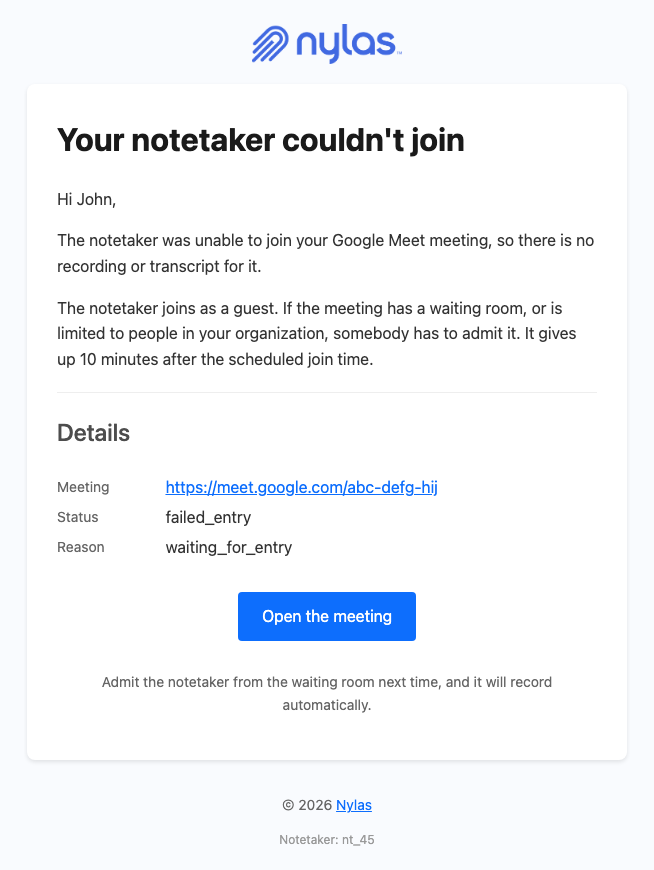
When does notetaker.meeting_state fire?
Section titled “When does notetaker.meeting_state fire?”On every change to the Notetaker’s state during a meeting. The payload carries 2 fields that together say what happened: status holds one of 4 top-level states, and meeting_state holds one of 20 sub-states explaining the reason.
status | Means |
|---|---|
connecting | Joining the meeting |
attending | In the meeting |
disconnected | No longer in the meeting |
failed_entry | Never got in |
meeting_state is where the reason lives, and the 20 values group into 5 kinds of outcome.
| Group | meeting_state values | Who can fix it |
|---|---|---|
| Waiting or refused entry | waiting_for_entry, entry_denied, admission_timeout, sign_in_required, meeting_capacity_reached | The host, during the meeting |
| Bad link or code | bad_meeting_code, bad_meeting_link, cannot_join | Whoever scheduled it |
| Ran normally | recording_active, meeting_ended, no_participants, no_activity | Nobody, this is the happy path |
| Removed from the meeting | kicked, api_request, cancelled | Depends on who removed it |
| Something broke | network_error, no_response, error, internal_error, unknown | You, from the logs |
The first 2 groups are the ones worth emailing about, because somebody can act on them while the meeting is still running. admission_timeout and waiting_for_entry are the most common: Notetaker joins as a guest, so a waiting room or an org-only meeting needs somebody to admit it, and it gives up 10 minutes after the scheduled join time.
sign_in_required and entry_denied are worth separating in your copy. The first means the platform wants an account, the second means a human refused the bot, and the advice differs.
How many of these will the workflow send?
Section titled “How many of these will the workflow send?”One per state change. A workflow on notetaker.meeting_state sends on every transition, including connecting and attending on a meeting that went fine.
Two ways to handle that:
Write the template to suit every state. The template in this recipe branches on status and meeting_state with the eq helper, so each message describes what actually happened: joining, recording, left, or couldn’t get in. This suits an internal or operations address, or a host who wants live updates.
Use the webhook to send only on failures. Subscribe to notetaker.meeting_state, check status in your handler, and send only on failed_entry through transactional send with the same template. Use this for customer-facing mail where one message per meeting is the right amount.
What should the email say?
Section titled “What should the email say?”Explain the cause, because failed_entry and admission_timeout mean nothing to the person reading them. The host doesn’t know Notetaker joins as a guest, and will assume the integration is broken rather than that a waiting room blocked it.
For a waiting-room failure, the template states three things: the recording doesn’t exist, the Notetaker was waiting to be admitted, and it waited 10 minutes. The fix is for the host to admit the bot next time. A bad link or a sign-in requirement gets its own sentence, because the fix there is on the calendar event or the meeting settings instead.
Include the meeting link so the host can jump back in if the call is still running. meeting_link is in the payload, and on a 60-minute meeting a notice at minute 10 still leaves time to admit the bot and capture what remains.
How do I create the workflow?
Section titled “How do I create the workflow?”Point an application-level workflow at notetaker.meeting_state.
curl -X POST 'https://api.us.nylas.com/v3/workflows' \ -H "Authorization: Bearer $NYLAS_API_KEY" -H 'Content-Type: application/json' \ -d '{ "name": "Notetaker join failure", "trigger_event": "notetaker.meeting_state", "template_id": "<TEMPLATE_ID>", "delay": 0, "is_enabled": true, "from": { "email": "[email protected]", "name": "Your Company" } }'Use delay: 0. A notice about a meeting in progress is worthless five minutes late.
The notetaker.meeting_state payload has no participant list. Send a test to confirm which address receives the message before you enable this for customers.
How does the template handle the payload?
Section titled “How does the template handle the payload?”The template picks its wording with eq, checking status first and then meeting_state for the detail. Handlebars {{else if}} keeps the chain flat:
{{#if (eq status "failed_entry")}} {{#if (eq meeting_state "bad_meeting_link")}}The meeting link didn't work. {{else if (eq meeting_state "entry_denied")}}Somebody declined to admit the Notetaker. {{else}}The Notetaker was waiting to be admitted. {{/if}}{{else if (eq status "disconnected")}} The Notetaker has left the meeting.{{else if (eq status "attending")}} The Notetaker is in the meeting and recording.{{else}} The Notetaker is joining.{{/if}}eq on a missing top-level field is false rather than an error, so a transition without meeting_state falls through to the {{else}} branch. There’s no or helper, so each value you want to handle gets its own {{else if}}.
The Details table prints status and meeting_state as they arrive, each in its own guard:
{{#if status}}{{status}}{{/if}}{{#if meeting_state}}{{meeting_state}}{{/if}}The raw values are there on purpose. failed_entry and waiting_for_entry are what a host will paste into a support conversation, and matching the string they saw to the string in your logs saves a round of questions.
meeting_provider is guarded inline so the sentence reads correctly whether or not it’s present:
your {{#if meeting_provider}}{{meeting_provider}} {{/if}}meetingWith the provider it reads “your Google Meet meeting”, without it “your meeting”. The trailing space inside the guard is deliberate.
The complete template
Section titled “The complete template”<!DOCTYPE html><html lang="en" xmlns="http://www.w3.org/1999/xhtml"><head> <meta charset="UTF-8" /> <meta name="viewport" content="width=device-width, initial-scale=1.0" /> <meta name="color-scheme" content="light only" /> <meta name="supported-color-schemes" content="light" /> <title>Notetaker status</title> <link href="https://fonts.googleapis.com/css2?family=Geist:wght@400;500;600&display=swap" rel="stylesheet" /> <style> body { margin: 0; padding: 0; background-color: #F2F2F4; } @media only screen and (max-width: 700px) { .wrap { width: 100% !important; } .pad { padding-left: 24px !important; padding-right: 24px !important; } .hero-pad { padding: 40px 16px 44px 16px !important; } .hero-wrap { padding: 0 8px !important; } .page-pad { padding: 12px 8px !important; } .wrap { border-radius: 10px !important; } .hero-pad a { white-space: normal !important; } .headline { font-size: 28px !important; line-height: 34px !important; } } </style></head>
<body style="margin: 0; padding: 0; background-color: #F2F2F4;"> {{!-- The header color follows status: Terra for failed_entry, Pink for disconnected, Blue otherwise. --}} <div style="display: none; max-height: 0; overflow: hidden; opacity: 0; mso-hide: all;">An update on your Notetaker.</div>
<table role="presentation" width="100%" cellpadding="0" cellspacing="0" border="0" bgcolor="#F2F2F4" style="background-color: #F2F2F4;"> <tr> <td class="page-pad" align="center" style="padding: 40px 16px;"> <table role="presentation" class="wrap" width="680" cellpadding="0" cellspacing="0" border="0" bgcolor="#FFFFFF" style="width: 680px; max-width: 680px; background-color: #FFFFFF; border-collapse: separate; border-radius: 12px; overflow: hidden; border: 1px solid #E4E4E8;">
<tr> <td class="pad" style="padding: 32px 48px 28px 48px;"> {{!-- Replace with your own logo. --}} <img src="https://developer.nylas.com/_images/email/nylas-logo.png" alt="Nylas" width="96" style="display: block; width: 96px; height: auto; border: 0;" /> </td> </tr>
<tr> <td class="hero-wrap" style="padding: 0 12px;"> <table role="presentation" width="100%" cellpadding="0" cellspacing="0" border="0" style="border-collapse: separate; border-radius: 8px; overflow: hidden;"> <tr> {{#if (eq status "failed_entry")}}<td class="hero-pad" bgcolor="#1F1F1F" style="padding: 52px 36px 56px 36px; border-radius: 8px; background-color: #1F1F1F; background-image: radial-gradient(ellipse 80% 90% at 85% 0%, #DD6B5F 0%, #5E3834 45%, #1F1F1F 78%);">{{else if (eq status "disconnected")}}<td class="hero-pad" bgcolor="#1F1F1F" style="padding: 52px 36px 56px 36px; border-radius: 8px; background-color: #1F1F1F; background-image: radial-gradient(ellipse 80% 90% at 85% 0%, #AE5E93 0%, #4E3445 45%, #1F1F1F 78%);">{{else}}<td class="hero-pad" bgcolor="#1F1F1F" style="padding: 52px 36px 56px 36px; border-radius: 8px; background-color: #1F1F1F; background-image: radial-gradient(ellipse 55% 60% at 100% 100%, #365462 0%, rgba(31, 31, 31, 0) 70%), radial-gradient(ellipse 80% 90% at 85% 0%, #3C5EC4 0%, #293455 45%, #1F1F1F 78%);">{{/if}} <h1 class="headline" style="margin: 0; font-family: Geist, Helvetica, Arial, sans-serif; font-size: 34px; line-height: 40px; font-weight: 500; letter-spacing: -0.5px; color: #FFFFFF; word-break: break-word;">{{#if (eq status "failed_entry")}}Your Notetaker couldn't join{{else if (eq status "disconnected")}}Your Notetaker left the meeting{{else if (eq status "attending")}}Your Notetaker is in the meeting{{else}}Your Notetaker is joining{{/if}}</h1> <div style="margin-top: 20px; font-size: 0; line-height: 0;">{{#if meeting_link}}<a href="{{meeting_link}}" style="display: inline-block; margin: 12px 12px 0 0; padding: 14px 28px; font-family: Geist, Helvetica, Arial, sans-serif; font-size: 16px; font-weight: 500; line-height: 20px; text-decoration: none; border-radius: 999px; white-space: nowrap; background-color: #FFFFFF; color: #080817; border: 1px solid #FFFFFF;">Open the meeting</a>{{/if}}</div> </td> </tr> </table> </td> </tr>
<tr> <td class="pad" style="padding: 40px 48px 0 48px; font-family: Geist, Helvetica, Arial, sans-serif; font-size: 16px; line-height: 26px; color: #1F1F1F; word-break: break-word;"> <p style="margin: 0;">{{#if recipient}}{{#if recipient.first_name}}Hi {{recipient.first_name}},{{else}}Hi,{{/if}}{{else}}Hi,{{/if}}</p> {{#if (eq status "failed_entry")}} <p style="margin: 16px 0 0 0;">The Notetaker couldn't get into your {{#if meeting_provider}}{{meeting_provider}} {{/if}}meeting, so there is no recording or transcript for it.</p> {{#if (eq meeting_state "bad_meeting_link")}} <p style="margin: 16px 0 0 0;">The meeting link didn't work. Check the link on the calendar event and send the Notetaker again.</p> {{else if (eq meeting_state "bad_meeting_code")}} <p style="margin: 16px 0 0 0;">The meeting code didn't work. Check the code on the calendar event and send the Notetaker again.</p> {{else if (eq meeting_state "sign_in_required")}} <p style="margin: 16px 0 0 0;">The meeting only admits signed-in users. Allow guests to join, then send the Notetaker again.</p> {{else if (eq meeting_state "entry_denied")}} <p style="margin: 16px 0 0 0;">Somebody in the meeting declined to admit the Notetaker.</p> {{else if (eq meeting_state "meeting_capacity_reached")}} <p style="margin: 16px 0 0 0;">The meeting was full.</p> {{else}} <p style="margin: 16px 0 0 0;">The Notetaker joins as a guest. If the meeting has a waiting room, or is limited to people in your organization, somebody has to admit it. It gives up 10 minutes after the scheduled join time.</p> {{/if}} {{else if (eq status "disconnected")}} {{#if (eq meeting_state "kicked")}} <p style="margin: 16px 0 0 0;">Somebody removed the Notetaker from your {{#if meeting_provider}}{{meeting_provider}} {{/if}}meeting. It recorded up to that point.</p> {{else if (eq meeting_state "meeting_ended")}} <p style="margin: 16px 0 0 0;">The meeting ended and the Notetaker has left. The recording and transcript are being processed.</p> {{else}} <p style="margin: 16px 0 0 0;">The Notetaker has left your {{#if meeting_provider}}{{meeting_provider}} {{/if}}meeting. The reason is below.</p> {{/if}} {{else if (eq status "attending")}} <p style="margin: 16px 0 0 0;">The Notetaker is in your {{#if meeting_provider}}{{meeting_provider}} {{/if}}meeting and recording.</p> {{else}} <p style="margin: 16px 0 0 0;">The Notetaker is joining your {{#if meeting_provider}}{{meeting_provider}} {{/if}}meeting. If the meeting has a waiting room, admit it when it appears.</p> {{/if}} </td> </tr>
<tr> <td class="pad" style="padding: 24px 48px 0 48px;"> <table role="presentation" width="100%" cellpadding="0" cellspacing="0" border="0" style="table-layout: fixed;"> {{#if status}} <tr> <td valign="top" width="104" style="width: 104px; padding: 12px 0; border-bottom: 1px solid #EFEFEF; font-family: Geist, Helvetica, Arial, sans-serif; font-size: 15px; line-height: 24px; color: #5F6368;">Status</td> <td valign="top" style="padding: 12px 0; border-bottom: 1px solid #EFEFEF; font-family: Geist, Helvetica, Arial, sans-serif; font-size: 15px; line-height: 24px; color: #1F1F1F; word-break: break-word; overflow-wrap: anywhere;">{{status}}</td> </tr> {{/if}} {{#if meeting_state}} <tr> <td valign="top" width="104" style="width: 104px; padding: 12px 0; border-bottom: 1px solid #EFEFEF; font-family: Geist, Helvetica, Arial, sans-serif; font-size: 15px; line-height: 24px; color: #5F6368;">Reason</td> <td valign="top" style="padding: 12px 0; border-bottom: 1px solid #EFEFEF; font-family: Geist, Helvetica, Arial, sans-serif; font-size: 15px; line-height: 24px; color: #1F1F1F; word-break: break-word; overflow-wrap: anywhere;">{{meeting_state}}</td> </tr> {{/if}} </table> </td> </tr>
<tr> <td class="pad" style="padding: 44px 48px 48px 48px;"> <table role="presentation" width="100%" cellpadding="0" cellspacing="0" border="0"> <tr> <td style="border-top: 1px solid #E6E6E6; padding-top: 20px; font-family: Geist, Helvetica, Arial, sans-serif; font-size: 13px; line-height: 20px; color: #5F6368; word-break: break-all;">{{#if id}}Notetaker {{id}}{{/if}}</td> </tr> </table> </td> </tr>
</table> </td> </tr> </table></body></html>Render it with POST /v3/templates/render once for each status value, and once with only id present. Notetaker troubleshooting covers the join failures this email reports.
What’s next
Section titled “What’s next”- Send the recording when Notetaker is ready for the successful path
- Notetaker troubleshooting explains each join failure and how to prevent it
- Why isn’t my workflow sending email? for guard rules and render testing
- Notetaker notifications for the full
notetaker.meeting_statepayload