If your Scheduler configuration turns on Notetaker, every meeting booked through it gets recorded and transcribed. Telling attendees that before the call is good manners, and in many places it’s a legal requirement. A booking.created workflow does it automatically.
Why not trigger this from the Notetaker event?
Section titled “Why not trigger this from the Notetaker event?”Because the Notetaker payload can’t reach the attendees. notetaker.created carries an event object containing only ical_uid, event_id, and master_event_id. There are no participants, no title, and no times, so a template fired from it has nobody to greet and nothing to describe.
booking.created has all of it: the full participant list, the title, the times, and recipient populated per person when notify_individually is set. Fire the notice from the booking and treat the Notetaker configuration as the reason you are sending it.
The decision to record is made on the configuration, not per booking. If notetaker_settings.enabled is true on a Scheduler configuration, every booking on that configuration is recorded, so every booking on it should carry the notice.
How do I know the meeting will be recorded?
Section titled “How do I know the meeting will be recorded?”Read it from the Scheduler configuration. scheduler.notetaker_settings.enabled controls whether a Notetaker session is created for bookings on that configuration. Notetaker needs a meeting link to join, so the configuration also needs event_booking.conferencing set.
curl "https://api.us.nylas.com/v3/grants/$GRANT_ID/scheduling/configurations/$CONFIG_ID" \ -H "Authorization: Bearer $NYLAS_API_KEY""scheduler": { "notetaker_settings": { "enabled": true }}How do I send the notice only for recorded configurations?
Section titled “How do I send the notice only for recorded configurations?”Branch on configuration_id inside the template. A workflow applies to every booking in your application and can’t be limited to one configuration, so a booking.created workflow fires for recorded and unrecorded bookings alike. Every booking payload carries configuration_id at the top level, next to booking_info.
{{#if (eq configuration_id "<RECORDED_CONFIGURATION_ID>")}} <p>This meeting will be recorded and transcribed.</p>{{else}} <p>Your meeting is booked.</p>{{/if}}Replace <RECORDED_CONFIGURATION_ID> with the ID of the configuration that has Notetaker enabled. The template in this recipe uses this pattern twice, for the heading and for the opening paragraph, so one template serves as the confirmation for every configuration. If you record on several configurations, nest another {{#if (eq ...)}} inside the {{else}} for each one.
How do I create the workflow?
Section titled “How do I create the workflow?”Point your booking.created workflow at the recording notice template instead of the plain confirmation. Because the template covers both cases, it replaces the confirmation for every configuration. Don’t run it alongside a second booking.created workflow, or attendees receive 2 messages about one booking.
curl -X POST 'https://api.us.nylas.com/v3/workflows' \ -H "Authorization: Bearer $NYLAS_API_KEY" -H 'Content-Type: application/json' \ -d '{ "name": "Booking confirmed, recording notice", "trigger_event": "booking.created", "template_id": "<TEMPLATE_ID>", "delay": 0, "is_enabled": true, "from": { "email": "[email protected]", "name": "Your Company" } }'Send it immediately with delay: 0. A disclosure that arrives after the meeting has started hasn’t done its job, and a booking made 10 minutes before the call leaves no room for a delay.
Enable notify_individually on the configuration so each attendee gets their own copy addressed to them. A single message to all participants leaves recipient undefined, and a disclosure that opens Hi there, to a room of people is weaker than one that names them.
What should the email say?
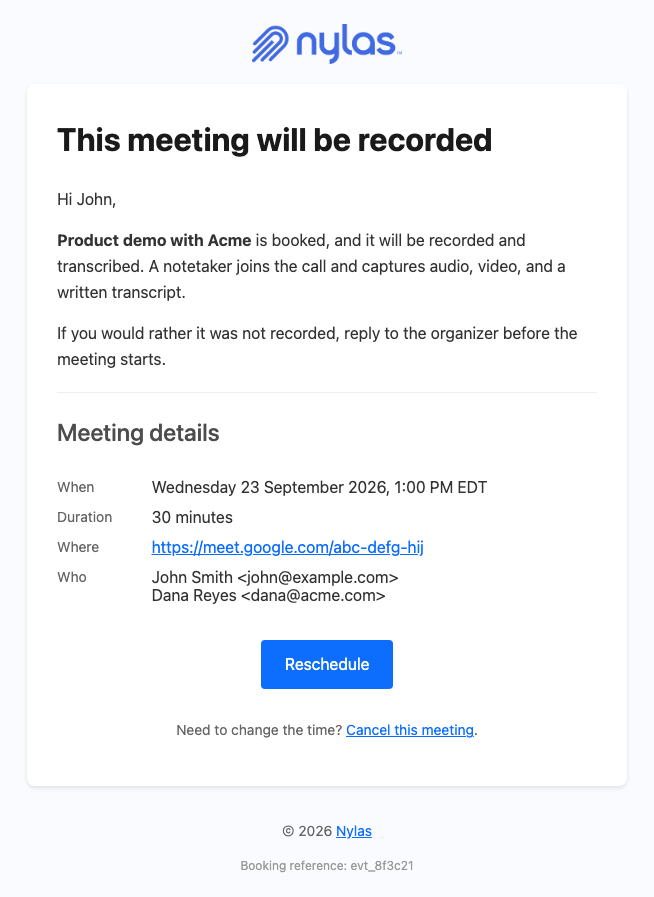
Section titled “What should the email say?”State plainly that the meeting will be recorded and transcribed, name what gets captured, and tell people how to object. The template in this recipe says audio, video, and a written transcript, because a Notetaker captures all three and “recorded” alone understates it.
Give an out that doesn’t require technical knowledge. Attendees can’t disable Notetaker themselves, so point them at the organizer rather than at a setting they can’t reach.
Keep the meeting details in the same email. A notice that arrives separately from the confirmation reads like a warning, while a confirmation that mentions recording reads like a normal part of booking. The template below is the standard confirmation, with the disclosure as its opening paragraph on recorded configurations.
The complete template
Section titled “The complete template”This is the confirmation template with the recording disclosure added for one configuration, including the per-recipient timezone chain. Customize Scheduler email for your app walks through how the greeting guards and timezone resolution work.
<!DOCTYPE html><html lang="en" xmlns="http://www.w3.org/1999/xhtml"><head>  <meta charset="UTF-8" />  <meta name="viewport" content="width=device-width, initial-scale=1.0" />  <meta name="color-scheme" content="light only" />  <meta name="supported-color-schemes" content="light" />  <title>{{booking_info.title}}</title>  <link href="https://fonts.googleapis.com/css2?family=Geist:wght@400;500;600&display=swap" rel="stylesheet" />  <style>    body { margin: 0; padding: 0; background-color: #F2F2F4; }    @media only screen and (max-width: 700px) {      .wrap { width: 100% !important; }      .pad { padding-left: 24px !important; padding-right: 24px !important; }      .hero-pad { padding: 40px 16px 44px 16px !important; }      .hero-wrap { padding: 0 8px !important; }      .page-pad { padding: 12px 8px !important; }      .wrap { border-radius: 10px !important; }      .hero-pad a { white-space: normal !important; }      .headline { font-size: 28px !important; line-height: 34px !important; }    }  </style></head>
<body style="margin: 0; padding: 0; background-color: #F2F2F4;">  {{!-- Replace <RECORDED_CONFIGURATION_ID> with the ID of the configuration that has Notetaker enabled. --}}  <div style="display: none; max-height: 0; overflow: hidden; opacity: 0; mso-hide: all;">{{#if (eq configuration_id "<RECORDED_CONFIGURATION_ID>")}}This meeting will be recorded and transcribed.{{else}}Your meeting is booked.{{/if}}</div>
  <table role="presentation" width="100%" cellpadding="0" cellspacing="0" border="0" bgcolor="#F2F2F4" style="background-color: #F2F2F4;">    <tr>      <td class="page-pad" align="center" style="padding: 40px 16px;">        <table role="presentation" class="wrap" width="680" cellpadding="0" cellspacing="0" border="0" bgcolor="#FFFFFF" style="width: 680px; max-width: 680px; background-color: #FFFFFF; border-collapse: separate; border-radius: 12px; overflow: hidden; border: 1px solid #E4E4E8;">
          <tr>            <td class="pad" style="padding: 32px 48px 28px 48px;">              {{!-- Replace with your own logo. --}}              <img src="https://developer.nylas.com/_images/email/nylas-logo.png" alt="Nylas" width="96" style="display: block; width: 96px; height: auto; border: 0;" />            </td>          </tr>
          <tr>            <td class="hero-wrap" style="padding: 0 12px;">              <table role="presentation" width="100%" cellpadding="0" cellspacing="0" border="0" style="border-collapse: separate; border-radius: 8px; overflow: hidden;">                <tr>            {{#if (eq configuration_id "<RECORDED_CONFIGURATION_ID>")}}<td class="hero-pad" bgcolor="#1F1F1F" style="padding: 52px 36px 56px 36px; border-radius: 8px; background-color: #1F1F1F; background-image: radial-gradient(ellipse 55% 60% at 100% 100%, #365462 0%, rgba(31, 31, 31, 0) 70%), radial-gradient(ellipse 80% 90% at 85% 0%, #3C5EC4 0%, #293455 45%, #1F1F1F 78%);">{{else}}<td class="hero-pad" bgcolor="#1F1F1F" style="padding: 52px 36px 56px 36px; border-radius: 8px; background-color: #1F1F1F; background-image: radial-gradient(ellipse 80% 90% at 85% 0%, #18AA9C 0%, #1D4D48 45%, #1F1F1F 78%);">{{/if}}              <h1 class="headline" style="margin: 0; font-family: Geist, Helvetica, Arial, sans-serif; font-size: 34px; line-height: 40px; font-weight: 500; letter-spacing: -0.5px; color: #FFFFFF; word-break: break-word;">{{#if (eq configuration_id "<RECORDED_CONFIGURATION_ID>")}}{{booking_info.title}} will be recorded{{else}}{{booking_info.title}} is booked{{/if}}</h1>              <p style="margin: 18px 0 0 0; font-family: Geist, Helvetica, Arial, sans-serif; font-size: 17px; line-height: 26px; color: #FFFFFF; word-break: break-word;">{{#if recipient}}{{#if booking_info.additional_fields}}{{#if (lookup booking_info.additional_fields recipient.email)}}{{ formatDate booking_info.start_time (lookup booking_info.additional_fields recipient.email) "EEEE d LLLL yyyy, h:mm a ZZZZ" "en" }}{{else}}{{#if booking_info.guest_timezone}}{{ formatDate booking_info.start_time booking_info.guest_timezone "EEEE d LLLL yyyy, h:mm a ZZZZ" "en" }}{{else}}{{ formatDate booking_info.start_time booking_info.organizer_timezone "EEEE d LLLL yyyy, h:mm a ZZZZ" "en" }}{{/if}}{{/if}}{{else}}{{#if booking_info.guest_timezone}}{{ formatDate booking_info.start_time booking_info.guest_timezone "EEEE d LLLL yyyy, h:mm a ZZZZ" "en" }}{{else}}{{ formatDate booking_info.start_time booking_info.organizer_timezone "EEEE d LLLL yyyy, h:mm a ZZZZ" "en" }}{{/if}}{{/if}}{{else}}{{#if booking_info.guest_timezone}}{{ formatDate booking_info.start_time booking_info.guest_timezone "EEEE d LLLL yyyy, h:mm a ZZZZ" "en" }}{{else}}{{ formatDate booking_info.start_time booking_info.organizer_timezone "EEEE d LLLL yyyy, h:mm a ZZZZ" "en" }}{{/if}}{{/if}}</p>              <div style="margin-top: 20px; font-size: 0; line-height: 0;">{{#unless booking_info.hide_rescheduling_options}}{{#if booking_info.participant_rescheduling_url}}<a href="{{booking_info.participant_rescheduling_url}}" style="display: inline-block; margin: 12px 12px 0 0; padding: 14px 28px; font-family: Geist, Helvetica, Arial, sans-serif; font-size: 16px; font-weight: 500; line-height: 20px; text-decoration: none; border-radius: 999px; white-space: nowrap; background-color: #FFFFFF; color: #080817; border: 1px solid #FFFFFF;">Reschedule</a>{{/if}}{{/unless}}{{#unless booking_info.hide_cancellation_options}}{{#if booking_info.participant_cancellation_url}}<a href="{{booking_info.participant_cancellation_url}}" style="display: inline-block; margin: 12px 12px 0 0; padding: 14px 28px; font-family: Geist, Helvetica, Arial, sans-serif; font-size: 16px; font-weight: 500; line-height: 20px; text-decoration: none; border-radius: 999px; white-space: nowrap; background-color: #503330; color: #FFFFFF; border: 1px solid #9A5048;">Cancel meeting</a>{{/if}}{{/unless}}</div>            </td>                </tr>              </table>            </td>          </tr>
          <tr>            <td class="pad" style="padding: 40px 48px 0 48px; font-family: Geist, Helvetica, Arial, sans-serif; font-size: 16px; line-height: 26px; color: #1F1F1F; word-break: break-word;">              <p style="margin: 0;">{{#if recipient}}{{#if recipient.first_name}}Hi {{recipient.first_name}},{{else}}Hi,{{/if}}{{else}}Hi,{{/if}}</p>              {{#if (eq configuration_id "<RECORDED_CONFIGURATION_ID>")}}              <p style="margin: 16px 0 0 0;">A Notetaker joins the call and captures audio, video, and a written transcript.</p>              <p style="margin: 16px 0 0 0;">If you would rather it was not recorded, reply to the organizer before the meeting starts.</p>              {{else}}              <p style="margin: 16px 0 0 0;">It's on your calendar. Here are the details.</p>              {{/if}}            </td>          </tr>
          <tr>            <td class="pad" style="padding: 24px 48px 0 48px;">              <table role="presentation" width="100%" cellpadding="0" cellspacing="0" border="0" style="table-layout: fixed;">                {{#if booking_info.duration}}                <tr>                  <td valign="top" width="104" style="width: 104px; padding: 12px 0; border-bottom: 1px solid #EFEFEF; font-family: Geist, Helvetica, Arial, sans-serif; font-size: 15px; line-height: 24px; color: #5F6368;">Duration</td>                  <td valign="top" style="padding: 12px 0; border-bottom: 1px solid #EFEFEF; font-family: Geist, Helvetica, Arial, sans-serif; font-size: 15px; line-height: 24px; color: #1F1F1F; word-break: break-word; overflow-wrap: anywhere;">{{booking_info.duration}} minutes</td>                </tr>                {{/if}}                {{#if booking_info.location}}                <tr>                  <td valign="top" width="104" style="width: 104px; padding: 12px 0; border-bottom: 1px solid #EFEFEF; font-family: Geist, Helvetica, Arial, sans-serif; font-size: 15px; line-height: 24px; color: #5F6368;">Where</td>                  <td valign="top" style="padding: 12px 0; border-bottom: 1px solid #EFEFEF; font-family: Geist, Helvetica, Arial, sans-serif; font-size: 15px; line-height: 24px; color: #1F1F1F; word-break: break-word; overflow-wrap: anywhere;"><a href="{{booking_info.location}}" style="color: #0B7D72; text-decoration: underline; word-break: break-all;">{{booking_info.location}}</a></td>                </tr>                {{/if}}                <tr>                  <td valign="top" width="104" style="width: 104px; padding: 12px 0; border-bottom: 1px solid #EFEFEF; font-family: Geist, Helvetica, Arial, sans-serif; font-size: 15px; line-height: 24px; color: #5F6368;">Who</td>                  <td valign="top" style="padding: 12px 0; border-bottom: 1px solid #EFEFEF; font-family: Geist, Helvetica, Arial, sans-serif; font-size: 15px; line-height: 24px; color: #1F1F1F; word-break: break-word; overflow-wrap: anywhere;">{{#each booking_info.participants}}{{#if name}}{{name}}{{else}}{{email}}{{/if}}{{#unless @last}}<br />{{/unless}}{{/each}}</td>                </tr>              </table>            </td>          </tr>
          <tr>            <td class="pad" style="padding: 44px 48px 48px 48px;">              <table role="presentation" width="100%" cellpadding="0" cellspacing="0" border="0">                <tr>                  <td style="border-top: 1px solid #E6E6E6; padding-top: 20px; font-family: Geist, Helvetica, Arial, sans-serif; font-size: 13px; line-height: 20px; color: #5F6368; word-break: break-all;">{{#if booking_info.event_id}}Booking reference {{booking_info.event_id}}{{/if}}</td>                </tr>              </table>            </td>          </tr>
        </table>      </td>    </tr>  </table></body></html>
Render it with POST /v3/templates/render before enabling the workflow. A missing variable returns 400 and sends nothing, which on a compliance email is a failure worth catching in testing rather than in production.
What’s next
Section titled “What’s next”- Tell Events API attendees the meeting is recorded for meetings created outside Scheduler
- Send the recording when Notetaker media is ready delivers the output afterwards
- Tell the host when Notetaker couldn’t join for the case where no recording happens
- Notetaker for how Notetaker joins meetings and what it captures