Notetaker finishes processing minutes after a call ends, and until someone checks the API nobody knows the recording exists. A notetaker.media workflow pushes it out the moment it’s ready.
When does notetaker.media fire?
Section titled “When does notetaker.media fire?”When processing completes and the media is downloadable. The payload arrives with state set to available and a media object holding signed URLs for each artefact Notetaker produced.
"media": { "recording": "<SIGNED_URL>", "transcript": "<SIGNED_URL>", "summary": "<SIGNED_URL>", "thumbnail": "<SIGNED_URL>", "recording_duration": "1800", "recording_file_format": "mp4"}Which keys are present depends on what the session was configured to capture. A session with transcription off has no transcript, and one with video_recording off has no recording. Guard every one of them, because the renderer throws on a missing key and sends nothing.
Who receives this email?
Section titled “Who receives this email?”Not the meeting attendees. notetaker.media carries an event object with only ical_uid, event_id, and master_event_id, so there is no participant list to address. Send a test to confirm which address receives the message before you enable this for customers. A standalone Notetaker has no grant behind it at all.
If attendees need the recording, send it from your own code: take event.event_id from the payload, fetch the event to get its participants, and send through transactional send. A workflow can’t do that lookup.
How do I create the workflow?
Section titled “How do I create the workflow?”Point an application-level workflow at notetaker.media. Notetaker sessions are created deliberately, so the volume is low and an application-level workflow is safe here.
curl -X POST 'https://api.us.nylas.com/v3/workflows' \ -H "Authorization: Bearer $NYLAS_API_KEY" -H 'Content-Type: application/json' \ -d '{ "name": "Recording ready", "trigger_event": "notetaker.media", "template_id": "<TEMPLATE_ID>", "delay": 0, "is_enabled": true, "from": { "email": "[email protected]", "name": "Your Company" } }'Use delay: 0. The value of this email decays fast, and the links it carries have a limited life of their own.
What about the signed URLs expiring?
Section titled “What about the signed URLs expiring?”Say so in the email. The URLs in media are signed and time-limited, so a recipient who opens the message a week later finds dead links and assumes the recording is gone.
Two ways to handle it. The simple one is to tell people to download what they want to keep, which the template below does in its footer. The durable one is to point the button at a page in your own product that fetches a fresh URL on demand, using the Notetaker id from the payload:
<a href="https://yourapp.com/recordings/{{id}}">Watch the recording</a>That costs you a route and removes the expiry problem entirely. It also means you control who can open the recording, which a signed URL forwarded in an email doesn’t.
How does the template handle missing media?
Section titled “How does the template handle missing media?”Every media key is guarded separately, so a session that recorded audio but not video still produces a sensible email rather than failing to render.
{{#if media}}{{#if media.recording}} <a href="{{media.recording}}">Download the recording</a>{{else}}not available{{/if}}{{/if}}Both levels are needed. media itself is absent on a session that produced nothing at all, and reaching through it throws. The {{else}} branch matters as much as the guard: a row that silently disappears leaves the reader wondering whether the transcript failed or was never requested.
recording_duration is a string of seconds rather than a formatted length, so 1800 means 30 minutes. There’s no helper for converting it, so either print it as seconds, as the template does, or format it in your own product and link out.
The complete template
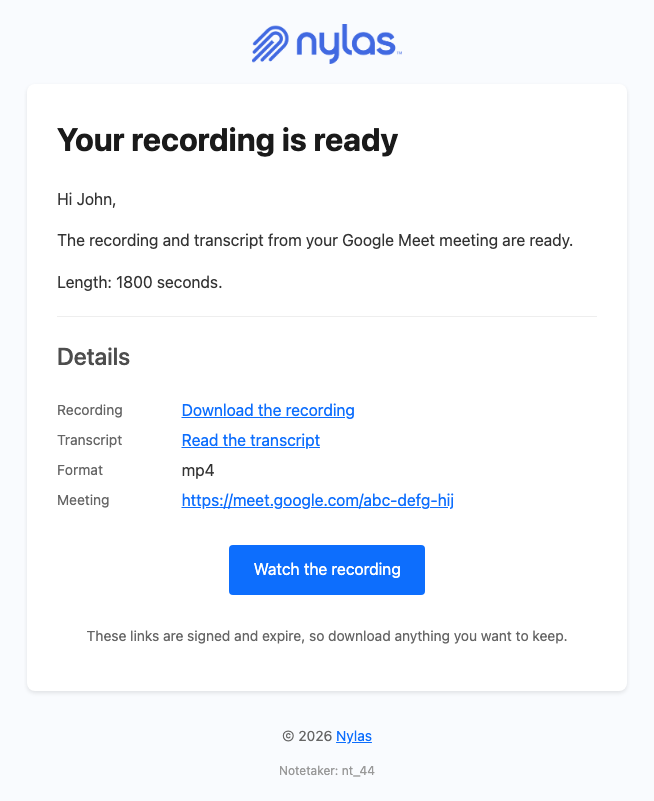
Section titled “The complete template”This renders the email above and handles a session missing any combination of recording, transcript, or duration.
<!DOCTYPE html><html lang="en" xmlns="http://www.w3.org/1999/xhtml"><head>  <meta charset="UTF-8" />  <meta name="viewport" content="width=device-width, initial-scale=1.0" />  <meta name="color-scheme" content="light only" />  <meta name="supported-color-schemes" content="light" />  <title>Your recording is ready</title>  <link href="https://fonts.googleapis.com/css2?family=Geist:wght@400;500;600&display=swap" rel="stylesheet" />  <style>    body { margin: 0; padding: 0; background-color: #F2F2F4; }    @media only screen and (max-width: 700px) {      .wrap { width: 100% !important; }      .pad { padding-left: 24px !important; padding-right: 24px !important; }      .hero-pad { padding: 40px 16px 44px 16px !important; }      .hero-wrap { padding: 0 8px !important; }      .page-pad { padding: 12px 8px !important; }      .wrap { border-radius: 10px !important; }      .hero-pad a { white-space: normal !important; }      .headline { font-size: 28px !important; line-height: 34px !important; }    }  </style></head>
<body style="margin: 0; padding: 0; background-color: #F2F2F4;">
  <div style="display: none; max-height: 0; overflow: hidden; opacity: 0; mso-hide: all;">The recording and transcript from your meeting are ready.</div>
  <table role="presentation" width="100%" cellpadding="0" cellspacing="0" border="0" bgcolor="#F2F2F4" style="background-color: #F2F2F4;">    <tr>      <td class="page-pad" align="center" style="padding: 40px 16px;">        <table role="presentation" class="wrap" width="680" cellpadding="0" cellspacing="0" border="0" bgcolor="#FFFFFF" style="width: 680px; max-width: 680px; background-color: #FFFFFF; border-collapse: separate; border-radius: 12px; overflow: hidden; border: 1px solid #E4E4E8;">
          <tr>            <td class="pad" style="padding: 32px 48px 28px 48px;">              {{!-- Replace with your own logo. --}}              <img src="https://developer.nylas.com/_images/email/nylas-logo.png" alt="Nylas" width="96" style="display: block; width: 96px; height: auto; border: 0;" />            </td>          </tr>
          <tr>            <td class="hero-wrap" style="padding: 0 12px;">              <table role="presentation" width="100%" cellpadding="0" cellspacing="0" border="0" style="border-collapse: separate; border-radius: 8px; overflow: hidden;">                <tr>            <td class="hero-pad" bgcolor="#1F1F1F" style="padding: 52px 36px 56px 36px; border-radius: 8px; background-color: #1F1F1F; background-image: radial-gradient(ellipse 55% 60% at 100% 100%, #365462 0%, rgba(31, 31, 31, 0) 70%), radial-gradient(ellipse 80% 90% at 85% 0%, #3C5EC4 0%, #293455 45%, #1F1F1F 78%);">              <h1 class="headline" style="margin: 0; font-family: Geist, Helvetica, Arial, sans-serif; font-size: 34px; line-height: 40px; font-weight: 500; letter-spacing: -0.5px; color: #FFFFFF; word-break: break-word;">Your recording is ready</h1>              <p style="margin: 18px 0 0 0; font-family: Geist, Helvetica, Arial, sans-serif; font-size: 16px; line-height: 26px; color: #BCCAF4; word-break: break-word;">The recording and transcript from your {{#if meeting_provider}}{{meeting_provider}} {{/if}}meeting are ready.</p>              <div style="margin-top: 20px; font-size: 0; line-height: 0;">{{#if media}}{{#if media.recording}}<a href="{{media.recording}}" style="display: inline-block; margin: 12px 12px 0 0; padding: 14px 28px; font-family: Geist, Helvetica, Arial, sans-serif; font-size: 16px; font-weight: 500; line-height: 20px; text-decoration: none; border-radius: 999px; white-space: nowrap; background-color: #FFFFFF; color: #080817; border: 1px solid #FFFFFF;">Download the recording</a>{{/if}}{{/if}}{{#if media}}{{#if media.transcript}}<a href="{{media.transcript}}" style="display: inline-block; margin: 12px 12px 0 0; padding: 14px 28px; font-family: Geist, Helvetica, Arial, sans-serif; font-size: 16px; font-weight: 500; line-height: 20px; text-decoration: none; border-radius: 999px; white-space: nowrap; background-color: #242B3E; color: #FFFFFF; border: 1px solid #304480;">Read the transcript</a>{{/if}}{{/if}}</div>            </td>                </tr>              </table>            </td>          </tr>
          <tr>            <td class="pad" style="padding: 40px 48px 0 48px; font-family: Geist, Helvetica, Arial, sans-serif; font-size: 16px; line-height: 26px; color: #1F1F1F; word-break: break-word;">              <p style="margin: 0;">{{#if recipient}}{{#if recipient.first_name}}Hi {{recipient.first_name}},{{else}}Hi,{{/if}}{{else}}Hi,{{/if}}</p>              <p style="margin: 16px 0 0 0;">These links are signed and expire, so download anything you want to keep.</p>            </td>          </tr>
          <tr>            <td class="pad" style="padding: 24px 48px 0 48px;">              <table role="presentation" width="100%" cellpadding="0" cellspacing="0" border="0" style="table-layout: fixed;">                {{#if media}}{{#if media.recording_duration}}                <tr>                  <td valign="top" width="104" style="width: 104px; padding: 12px 0; border-bottom: 1px solid #EFEFEF; font-family: Geist, Helvetica, Arial, sans-serif; font-size: 15px; line-height: 24px; color: #5F6368;">Length</td>                  <td valign="top" style="padding: 12px 0; border-bottom: 1px solid #EFEFEF; font-family: Geist, Helvetica, Arial, sans-serif; font-size: 15px; line-height: 24px; color: #1F1F1F; word-break: break-word; overflow-wrap: anywhere;">{{media.recording_duration}} seconds</td>                </tr>                {{/if}}{{/if}}                {{#if media}}{{#if media.recording_file_format}}                <tr>                  <td valign="top" width="104" style="width: 104px; padding: 12px 0; border-bottom: 1px solid #EFEFEF; font-family: Geist, Helvetica, Arial, sans-serif; font-size: 15px; line-height: 24px; color: #5F6368;">Format</td>                  <td valign="top" style="padding: 12px 0; border-bottom: 1px solid #EFEFEF; font-family: Geist, Helvetica, Arial, sans-serif; font-size: 15px; line-height: 24px; color: #1F1F1F; word-break: break-word; overflow-wrap: anywhere;">{{media.recording_file_format}}</td>                </tr>                {{/if}}{{/if}}                {{#if meeting_link}}                <tr>                  <td valign="top" width="104" style="width: 104px; padding: 12px 0; border-bottom: 1px solid #EFEFEF; font-family: Geist, Helvetica, Arial, sans-serif; font-size: 15px; line-height: 24px; color: #5F6368;">Meeting</td>                  <td valign="top" style="padding: 12px 0; border-bottom: 1px solid #EFEFEF; font-family: Geist, Helvetica, Arial, sans-serif; font-size: 15px; line-height: 24px; color: #1F1F1F; word-break: break-word; overflow-wrap: anywhere;"><a href="{{meeting_link}}" style="color: #0B7D72; text-decoration: underline; word-break: break-all;">{{meeting_link}}</a></td>                </tr>                {{/if}}              </table>            </td>          </tr>
          <tr>            <td class="pad" style="padding: 44px 48px 48px 48px;">              <table role="presentation" width="100%" cellpadding="0" cellspacing="0" border="0">                <tr>                  <td style="border-top: 1px solid #E6E6E6; padding-top: 20px; font-family: Geist, Helvetica, Arial, sans-serif; font-size: 13px; line-height: 20px; color: #5F6368; word-break: break-all;">{{#if id}}Notetaker {{id}}{{/if}}</td>                </tr>              </table>            </td>          </tr>
        </table>      </td>    </tr>  </table></body></html>
Render it with POST /v3/templates/render against a payload with media absent as well as a full one. The Notetaker notification reference publishes the full payload shape.
What’s next
Section titled “What’s next”- Tell the host when Notetaker couldn’t join for the case where no media is ever produced
- Tell Scheduler attendees the meeting is recorded for the disclosure that should precede this
- Notetaker for session settings and what each one captures
- Notetaker notifications for the full
notetaker.mediapayload