A user has just handed your product access to their mailbox. That’s the moment they’re most likely to wonder what they agreed to, and the moment a clear email does the most good. A grant.created workflow sends one automatically.
This is also the cheapest workflow to build, because grant.created needs no configuration and fires exactly once per connection.
What does grant.created give me?
Section titled “What does grant.created give me?”More than the other grant events. It’s the only one carrying the user’s display name and the list of scopes they approved, which is what makes a useful welcome email possible.
| Field | Example | Present on other grant events |
|---|---|---|
email | [email protected] | yes |
provider | google | yes |
name | John Doe | no |
scope | ["gmail.readonly", "calendar"] | no |
grant_id | <NYLAS_GRANT_ID> | yes |
login_id | <LOGIN_ID> | no |
code | 25012 | yes, with a different value |
Variables sit at the payload root, so it’s {{email}} and {{provider}}, not {{grant.email}}. There’s no booking_info wrapper and no recipient object, so use {{email}} for the account address and guard everything else.
Why does listing the permissions matter?
Section titled “Why does listing the permissions matter?”It answers the question your support inbox gets. “Why does this app want access to my email” often arrives days after the connection, when the user has forgotten what they clicked.
Printing scope back to them turns that into a record they can check. It also gives your support team something to point at when a user claims they never granted calendar access.
{{#if scope}}{{#each scope}}{{this}}<br />{{/each}}{{else}}not reported{{/if}}{{this}} is the current item inside {{#each}}, since scope is an array of strings rather than objects. The {{else}} branch covers a payload with no scope list.
Consider translating the raw scope strings into plain descriptions in your own copy. https://www.googleapis.com/auth/gmail.readonly is accurate and means nothing to a user, while “read your email, but not send or delete” is the sentence they need. Either keep the raw values as a reference list, as this template does, or map the scopes your product requests with eq inside the loop: {{#each scope}}{{#if (eq this "https://www.googleapis.com/auth/gmail.readonly")}}Read your email{{/if}}{{/each}}.
How do I create the workflow?
Section titled “How do I create the workflow?”Create a template, then an application-level workflow. grant.created accepts either sender. Omit from and the welcome arrives from the user’s own address, which reads oddly for an onboarding email, so this is a good case for transactional send.
curl -X POST 'https://api.us.nylas.com/v3/workflows' \ -H "Authorization: Bearer $NYLAS_API_KEY" -H 'Content-Type: application/json' \ -d '{ "name": "Welcome, account connected", "trigger_event": "grant.created", "template_id": "<TEMPLATE_ID>", "delay": 0, "is_enabled": true, "from": { "email": "[email protected]", "name": "Your Company" } }'Without from, the workflow sends through the grant that was just created. That mostly works here, since the grant is alive, but it means your welcome email arrives from the user’s own address, which reads oddly at best. A grant authenticated with identity-only scopes can’t send at all, and that failure is silent.
delay: 0 is right. The user is still in your product, and a welcome email that arrives an hour later has lost the context it depends on.
Should I use this to provision other things?
Section titled “Should I use this to provision other things?”No. A workflow can only send email. If connecting an account should also create grant-level workflows, seed a database row, or start a sync, do that from a grant.created webhook in your own code.
Running both is fine and common: the webhook does the provisioning, the workflow sends the email. They’re independent, so a failure in your handler doesn’t stop the welcome going out.
Customize Scheduler email for each user covers the provisioning side, where grant.created is the hook that creates a new customer’s grant-level workflows.
The complete template
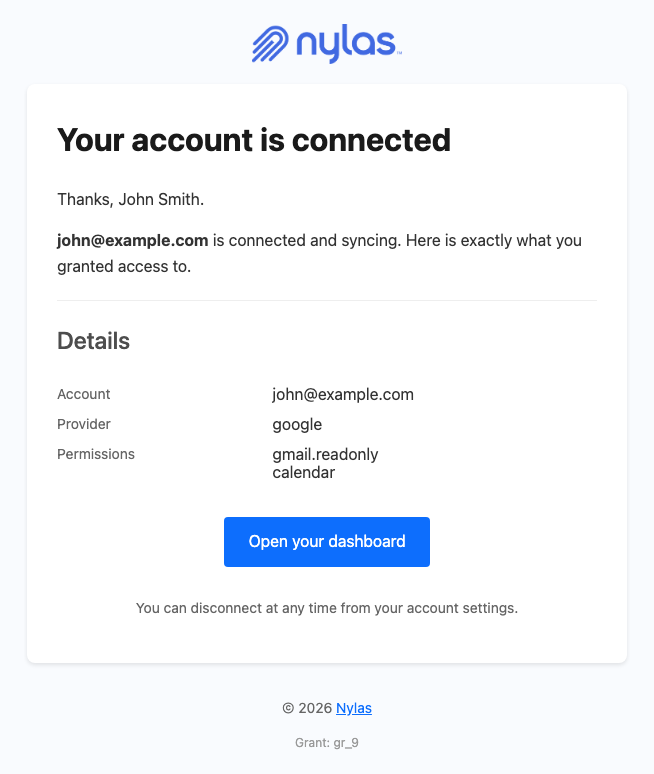
Section titled “The complete template”This greets the user by name when the provider supplies one, falls back cleanly when it doesn’t, and lists the granted scopes.
<!DOCTYPE html><html lang="en" xmlns="http://www.w3.org/1999/xhtml"><head>  <meta charset="UTF-8" />  <meta name="viewport" content="width=device-width, initial-scale=1.0" />  <meta name="color-scheme" content="light only" />  <meta name="supported-color-schemes" content="light" />  <title>Your account is connected</title>  <link href="https://fonts.googleapis.com/css2?family=Geist:wght@400;500;600&display=swap" rel="stylesheet" />  <style>    body { margin: 0; padding: 0; background-color: #F2F2F4; }    @media only screen and (max-width: 700px) {      .wrap { width: 100% !important; }      .pad { padding-left: 24px !important; padding-right: 24px !important; }      .hero-pad { padding: 40px 16px 44px 16px !important; }      .hero-wrap { padding: 0 8px !important; }      .page-pad { padding: 12px 8px !important; }      .wrap { border-radius: 10px !important; }      .hero-pad a { white-space: normal !important; }      .headline { font-size: 28px !important; line-height: 34px !important; }    }  </style></head>
<body style="margin: 0; padding: 0; background-color: #F2F2F4;">
  <div style="display: none; max-height: 0; overflow: hidden; opacity: 0; mso-hide: all;">Your account is connected and syncing.</div>
  <table role="presentation" width="100%" cellpadding="0" cellspacing="0" border="0" bgcolor="#F2F2F4" style="background-color: #F2F2F4;">    <tr>      <td class="page-pad" align="center" style="padding: 40px 16px;">        <table role="presentation" class="wrap" width="680" cellpadding="0" cellspacing="0" border="0" bgcolor="#FFFFFF" style="width: 680px; max-width: 680px; background-color: #FFFFFF; border-collapse: separate; border-radius: 12px; overflow: hidden; border: 1px solid #E4E4E8;">
          <tr>            <td class="pad" style="padding: 32px 48px 28px 48px;">              {{!-- Replace with your own logo. --}}              <img src="https://developer.nylas.com/_images/email/nylas-logo.png" alt="Nylas" width="96" style="display: block; width: 96px; height: auto; border: 0;" />            </td>          </tr>
          <tr>            <td class="hero-wrap" style="padding: 0 12px;">              <table role="presentation" width="100%" cellpadding="0" cellspacing="0" border="0" style="border-collapse: separate; border-radius: 8px; overflow: hidden;">                <tr>            <td class="hero-pad" bgcolor="#1F1F1F" style="padding: 52px 36px 56px 36px; border-radius: 8px; background-color: #1F1F1F; background-image: radial-gradient(ellipse 80% 90% at 85% 0%, #18AA9C 0%, #1D4D48 45%, #1F1F1F 78%);">              <h1 class="headline" style="margin: 0; font-family: Geist, Helvetica, Arial, sans-serif; font-size: 34px; line-height: 40px; font-weight: 500; letter-spacing: -0.5px; color: #FFFFFF; word-break: break-word;">Your account is connected</h1>              <p style="margin: 18px 0 0 0; font-family: Geist, Helvetica, Arial, sans-serif; font-size: 16px; line-height: 26px; color: #AEEAE4; word-break: break-word;">{{#if email}}<span style="font-weight: 500;">{{email}}</span>{{else}}Your account{{/if}} is connected and syncing.</p>            </td>                </tr>              </table>            </td>          </tr>
          <tr>            <td class="pad" style="padding: 40px 48px 0 48px; font-family: Geist, Helvetica, Arial, sans-serif; font-size: 16px; line-height: 26px; color: #1F1F1F; word-break: break-word;">              <p style="margin: 0;">{{#if recipient}}{{#if recipient.first_name}}Hi {{recipient.first_name}},{{else}}Hi,{{/if}}{{else}}Hi,{{/if}}</p>              <p style="margin: 16px 0 0 0;">{{#if name}}Thanks, {{name}}. {{/if}}Here is exactly what you granted access to. You can disconnect at any time from your account settings.</p>            </td>          </tr>
          <tr>            <td class="pad" style="padding: 24px 48px 0 48px;">              <table role="presentation" width="100%" cellpadding="0" cellspacing="0" border="0" style="table-layout: fixed;">                <tr>                  <td valign="top" width="104" style="width: 104px; padding: 12px 0; border-bottom: 1px solid #EFEFEF; font-family: Geist, Helvetica, Arial, sans-serif; font-size: 15px; line-height: 24px; color: #5F6368;">Account</td>                  <td valign="top" style="padding: 12px 0; border-bottom: 1px solid #EFEFEF; font-family: Geist, Helvetica, Arial, sans-serif; font-size: 15px; line-height: 24px; color: #1F1F1F; word-break: break-word; overflow-wrap: anywhere;">{{#if email}}{{email}}{{else}}your connected account{{/if}}</td>                </tr>                <tr>                  <td valign="top" width="104" style="width: 104px; padding: 12px 0; border-bottom: 1px solid #EFEFEF; font-family: Geist, Helvetica, Arial, sans-serif; font-size: 15px; line-height: 24px; color: #5F6368;">Provider</td>                  <td valign="top" style="padding: 12px 0; border-bottom: 1px solid #EFEFEF; font-family: Geist, Helvetica, Arial, sans-serif; font-size: 15px; line-height: 24px; color: #1F1F1F; word-break: break-word; overflow-wrap: anywhere;">{{#if provider}}{{provider}}{{else}}not reported{{/if}}</td>                </tr>                <tr>                  <td valign="top" width="104" style="width: 104px; padding: 12px 0; border-bottom: 1px solid #EFEFEF; font-family: Geist, Helvetica, Arial, sans-serif; font-size: 15px; line-height: 24px; color: #5F6368;">Permissions</td>                  <td valign="top" style="padding: 12px 0; border-bottom: 1px solid #EFEFEF; font-family: Geist, Helvetica, Arial, sans-serif; font-size: 15px; line-height: 24px; color: #1F1F1F; word-break: break-word; overflow-wrap: anywhere;">{{#if scope}}{{#each scope}}{{this}}<br />{{/each}}{{else}}not reported{{/if}}</td>                </tr>              </table>            </td>          </tr>
          <tr>            <td class="pad" style="padding: 44px 48px 48px 48px;">              <table role="presentation" width="100%" cellpadding="0" cellspacing="0" border="0">                <tr>                  <td style="border-top: 1px solid #E6E6E6; padding-top: 20px; font-family: Geist, Helvetica, Arial, sans-serif; font-size: 13px; line-height: 20px; color: #5F6368; word-break: break-all;">{{#if grant_id}}Grant {{grant_id}}{{/if}}</td>                </tr>              </table>            </td>          </tr>
        </table>      </td>    </tr>  </table></body></html>
The greeting guard is worth noting, because name is absent on providers that don’t return a profile:
{{#if name}}<p>Thanks, {{name}}.</p>{{else}}<p>Hi there,</p>{{/if}}Render it with POST /v3/templates/render against a payload containing only grant_id as well as a full one. If the stripped version renders, the guards hold.
What’s next
Section titled “What’s next”- Reduce churn by catching inactive accounts is the other half of the account lifecycle
- Customize Scheduler email for each user provisions grant-level workflows from this same event
- Grant notifications for the full
grant.createdpayload - Authentication for the OAuth flow that produces the grant