Scheduler sends booking confirmations for you, and you can’t change their wording or branding. An application-level workflow replaces them with your own HTML, using one template that applies to every user of your product.
This recipe covers the whole booking lifecycle: confirmation, reschedule, cancellation, pending approval, and reminder. If each of your customers needs their own branding, use Customize Scheduler email for each user instead.
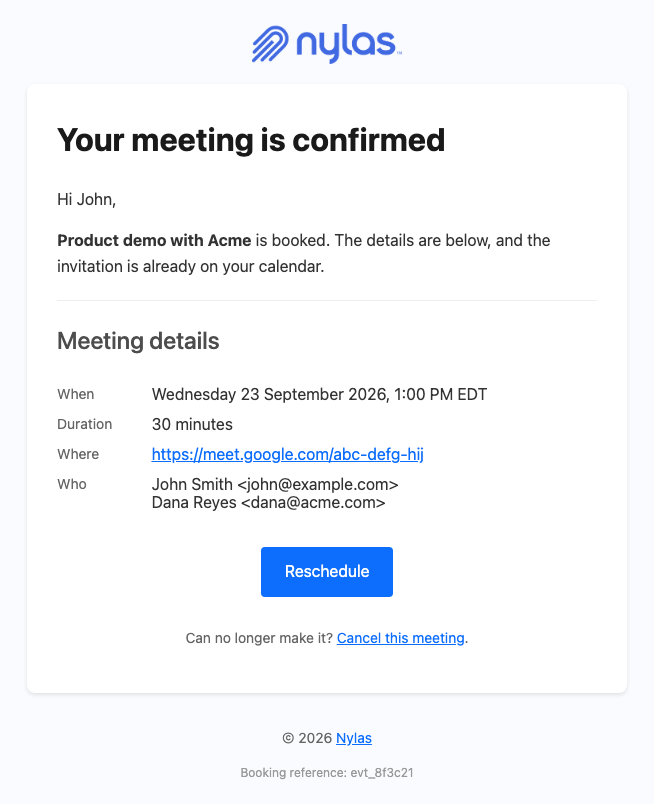
How do I replace the Scheduler confirmation email?
Section titled “How do I replace the Scheduler confirmation email?”Create a template, point an application-level workflow at it, then turn off Nylas’s own email on the Scheduler configuration. The workflow fires for every grant in the application, so one template covers every user.
Start with the template. Set engine to handlebars explicitly, because the API default is mustache and mustache can’t call the formatDate helper you need for times.
curl -X POST 'https://api.us.nylas.com/v3/templates' \ -H "Authorization: Bearer $NYLAS_API_KEY" -H 'Content-Type: application/json' \ -d '{ "name": "Booking confirmed", "engine": "handlebars", "subject": "Confirmed: {{booking_info.title}}", "body": "<html>…</html>" }'body is a JSON string, so every quote and line break in the HTML needs escaping. Rather than escaping by hand, let jq build the request from the template file:
jq -n --rawfile body booking-created.html \ '{name: "Booking confirmed", engine: "handlebars", subject: "Confirmed: {{booking_info.title}}", body: $body}' \| curl -X POST 'https://api.us.nylas.com/v3/templates' \ -H "Authorization: Bearer $NYLAS_API_KEY" -H 'Content-Type: application/json' \ -d @-Then the workflow. delay is in minutes and 0 sends immediately.
The from address decides who the confirmation appears to come from. Omit it and the message sends through the host’s own grant, so the guest sees it arrive from the host’s real address, in the same thread as their other correspondence, with replies landing in the host’s inbox. That needs no domain setup, only mail send scopes on the grant. Set from and it sends through transactional send on a domain you registered, which gives every host the same branding. The Workflows overview compares both.
For booking confirmations the host’s own address is often the better choice, because a confirmation that looks personal gets replied to and a no-reply one doesn’t.
curl -X POST 'https://api.us.nylas.com/v3/workflows' \ -H "Authorization: Bearer $NYLAS_API_KEY" -H 'Content-Type: application/json' \ -d '{ "name": "Booking confirmed", "trigger_event": "booking.created", "template_id": "<TEMPLATE_ID>", "delay": 0, "is_enabled": true, "from": { "email": "[email protected]", "name": "Your Company" } }'Drop the from line entirely to send from the host’s mailbox instead. Everything else stays the same.
Repeat for each of the 5 booking triggers with its own template. booking.rescheduled and booking.reminder drop 4 fields that booking.created carries, and booking.cancelled has no booking_ref, so one shared template throws on whichever trigger lacks a field it references.
How do I stop Nylas sending its own email?
Section titled “How do I stop Nylas sending its own email?”Set disable_emails: true on the Scheduler configuration. Two fields control this independently, and your choice depends on whether guests also need the calendar provider’s invitation.
disable_emails | notify_participants | Messages the guest receives |
|---|---|---|
false | false | Nylas Scheduler email plus your workflow email |
true | false | Your workflow email only |
true | true | Your workflow email plus the Google or Microsoft calendar invitation |
Choose notify_participants: true when guests need a calendar reply button and a .ics attachment, which an HTML email can’t provide. The provider sends that invitation from the organizer’s own address rather than from Nylas, so it won’t carry your branding. Microsoft grants ignore notify_participants and always notify, so the workflow-only setup isn’t achievable on Microsoft.
{ "event_booking": { "title": "Meeting with ${invitee}", "booking_type": "booking", "disable_emails": true, "notify_participants": false, "reminders": [{ "type": "webhook", "minutes_before_event": 30 }] }, "scheduler": { "additional_fields": { "notify_individually": { "label": "Notify individually", "type": "metadata", "required": false, "default": "true" } } }}reminders with type: "webhook" is what makes booking.reminder fire, and without it that trigger never runs. Use booking_type: "organizer-confirmation" for booking.pending, which also requires scheduler.organizer_confirmation_url or the request returns 400. PUT merges your body into the existing configuration, so settings you leave out are kept. The exception is scheduler.additional_fields, which is replaced as a whole: when you add a field, send every field the configuration already has alongside it, or the ones you omit are removed.
How do I address each guest by name?
Section titled “How do I address each guest by name?”Set notify_individually on the booking. Nylas then sends one message per participant and populates recipient.email, recipient.first_name, and recipient.last_name for each. By default it sends a single message to all participants, leaving recipient undefined so any template referencing it fails to render.
The field has to be declared on the configuration first, as shown above. Passing it on the booking alone returns 400 Additional field 'notify_individually' not found in configuration.
Bookings made on a scheduling page pick up "true" automatically. The booking form doesn’t show a metadata field, but the page sends its default value with the booking when the guest submits. If your own code creates bookings with POST /v3/scheduling/bookings, include the value in the request, because the Bookings API doesn’t read default:
{ "additional_fields": { "notify_individually": "true" }, "start_time": 1790182800, "end_time": 1790184600, "participants": [],}A booking with a guest named John Smith and an organizer named Nick then produces 2 messages from one template, reading Hi John, and Hi Nick,.
Do workflows work with Group Configurations?
Section titled “Do workflows work with Group Configurations?”Yes. booking.created and booking.reminder both fire for group events, and the same templates render them. A Group Configuration keeps its email settings in group_booking instead of event_booking, so set disable_emails and the webhook reminder there:
{ "group_booking": { "booking_type": "booking", "calendar_id": "primary", "disable_emails": true, "reminders": [{ "type": "webhook", "minutes_before_event": 30 }] }}PUT replaces group_booking as a whole, so send its existing booking_type and calendar_id with your changes. A request that sends event_booking to a Group Configuration returns 400 EventBooking is not supported for Group Events configuration.
Group events differ from other bookings in 3 ways:
- No calendar invitation. A Group Configuration has no
notify_participants, so the workflow email is the only message a guest receives. - No
recipient. Group bookings don’t populaterecipient, even when the booking setsnotify_individually, so guests see the template’s fallback greeting. - One reminder per session. Scheduler creates the webhook reminder when the first guest books, so
booking.reminderfires once per group event, withadditional_fieldsset tonull.
How does the template work?
Section titled “How does the template work?”The template is ordinary HTML with {{variable}} placeholders filled from the event payload. The renderer runs in strict mode, so every value that can be missing is guarded, and every guard has a fallback. Five parts do the real work.
The greeting guards two levels. recipient is absent whenever notify_individually is off, and present but unnamed when a participant has no display name. The renderer throws on a missing parent, so a single guard isn’t enough.
{{#if recipient}}{{#if recipient.first_name}}Hi {{recipient.first_name}},{{else}}Hi,{{/if}}{{else}}Hi,{{/if}}The time resolves per recipient. booking_info is identical in every copy of a message and only recipient changes between them, so one timezone expression would give every recipient the same zone. lookup works as a nested expression, which is enough to pick a zone per person. Each level has its own {{else}}, so the time still renders when recipient or additional_fields is missing.
{{#if recipient}}{{#if booking_info.additional_fields}}{{#if (lookup booking_info.additional_fields recipient.email)}} {{ formatDate booking_info.start_time (lookup booking_info.additional_fields recipient.email) "DDDD, t ZZZZ" booking_info.guest_language }}{{else}} {{#if booking_info.guest_timezone}}{{ formatDate booking_info.start_time booking_info.guest_timezone "DDDD, t ZZZZ" booking_info.guest_language }}{{else}}{{ formatDate booking_info.start_time booking_info.organizer_timezone "DDDD, t ZZZZ" booking_info.guest_language }}{{/if}}{{/if}}{{else}} {{#if booking_info.guest_timezone}}{{ formatDate booking_info.start_time booking_info.guest_timezone "DDDD, t ZZZZ" booking_info.guest_language }}{{else}}{{ formatDate booking_info.start_time booking_info.organizer_timezone "DDDD, t ZZZZ" booking_info.guest_language }}{{/if}}{{/if}}{{else}} {{#if booking_info.guest_timezone}}{{ formatDate booking_info.start_time booking_info.guest_timezone "DDDD, t ZZZZ" booking_info.guest_language }}{{else}}{{ formatDate booking_info.start_time booking_info.organizer_timezone "DDDD, t ZZZZ" booking_info.guest_language }}{{/if}}{{/if}}The complete templates wrap this in {{#if booking_info.guest_language}} and repeat it with "en" as the locale in the {{else}}, because a missing locale also fails the render.
That resolves in 4 steps: the recipient’s own timezone, then guest_timezone, then organizer_timezone, then UTC. guest_timezone is only set when the guest supplies one and is an empty string otherwise, which formatDate would silently treat as UTC, so the {{#if}} skips it when empty. organizer_timezone carries the configuration’s event_booking.timezone, and if that’s empty too, formatDate uses UTC. A value that isn’t a valid IANA timezone fails the render, so check the per-recipient values before you send them.
Supply the per-recipient dictionary in the booking request. It’s different for every booking, so it can’t come from a configuration default. Email addresses are valid field keys.
"additional_fields": { "notify_individually": "true",}One booking with a host in America/Chicago and a guest in America/New_York then produces 1:00 PM EDT for the guest and 12:00 PM CDT for the host, from the same template. Leave the guest out of the dictionary and they get organizer_timezone instead, because guest_timezone is empty on bookings made through the API.
Dates follow the guest’s language. formatDate takes a timestamp, an IANA timezone, a Luxon token string, and a locale, and all 4 accept variables. DDDD and t are Luxon’s localized date and time tokens, so passing booking_info.guest_language renders miércoles, 23 de septiembre de 2026, 19:00 CEST for es in Europe/Madrid and Mittwoch, 23. September 2026, 19:00 MESZ for de in Europe/Berlin, each with that language’s clock format. The template’s own copy is English. To translate it, branch on the language with eq:
{{#if (eq booking_info.guest_language "es")}}Reunión confirmada{{else if (eq booking_info.guest_language "fr")}}Rendez-vous confirmé{{else}}Your meeting is confirmed{{/if}}Optional fields and actions are wrapped. location, duration, event_description, old_start_time, and cancellation_reason can each be missing or empty, so each detail row sits inside {{#if}} and disappears cleanly rather than failing the render or leaving a dangling label. The Reschedule and Cancel buttons check both the URL and the configuration’s hide_rescheduling_options and hide_cancellation_options, so a configuration that hides them doesn’t get them back in email. event_description is the calendar event description that Scheduler writes: the configuration’s description followed by its own meeting, reschedule, and cancel links, as HTML. The template renders it with triple braces, {{{booking_info.event_description}}}, because double braces would escape the HTML and show raw tags.
{{#unless booking_info.hide_cancellation_options}}{{#if booking_info.participant_cancellation_url}} <a href="{{booking_info.participant_cancellation_url}}">Cancel meeting</a>{{/if}}{{/unless}}Long values wrap. Titles, email addresses, and meeting links can be any length, so the headline and detail cells set word-break: break-word and the link sets break-all. A 300-character title or a 40-person attendee list wraps inside a 320px screen instead of forcing a horizontal scroll.
How do I show each user’s logo?
Section titled “How do I show each user’s logo?”Store each user’s logo URL in a hidden metadata field on their Scheduler configuration, and read it in the template. When a booking has no logo, the template falls back to your own default. One application-level workflow still covers every user.
-
Host the user’s logo anywhere public, such as your own storage or the user’s website.
-
Add a
logo_urlfield to the user’s configuration, with the URL indefault:{"scheduler": {"additional_fields": {"notify_individually": {"label": "Notify individually","type": "metadata","required": false,"default": "true"},"logo_url": {"label": "Logo URL","type": "metadata","required": false,"default": "https://cdn.example.com/customers/acme/logo.png"}}}}scheduler.additional_fieldsis replaced as a whole on update, so include your existing fields, such asnotify_individually. -
Use this block for the logo in each booking template. The complete templates below already include it:
{{#if booking_info.additional_fields}}{{#if booking_info.additional_fields.logo_url}}<img src="{{booking_info.additional_fields.logo_url}}" alt="Company logo" style="max-width: 150px;" />{{else}}<img src="https://cdn.example.com/brand/default-logo.png" alt="Company logo" style="max-width: 150px;" />{{/if}}{{else}}<img src="https://cdn.example.com/brand/default-logo.png" alt="Company logo" style="max-width: 150px;" />{{/if}}
Bookings made on a scheduling page get the user’s logo automatically. If your own code creates bookings through the Bookings API, pass logo_url in the request’s additional_fields, or the email shows your default. Group-event reminders also show the default, because they carry no additional_fields.
Use metadata in workflow templates covers other values you can pass this way and which ones are safe to store.
The complete template
Section titled “The complete template”This is the booking.created template from the screenshot above. The other 4 booking triggers follow the same structure with their own fields.
<!DOCTYPE html><html lang="en" xmlns="http://www.w3.org/1999/xhtml"><head>  <meta charset="UTF-8" />  <meta name="viewport" content="width=device-width, initial-scale=1.0" />  <meta name="color-scheme" content="light only" />  <meta name="supported-color-schemes" content="light" />  <title>{{booking_info.title}}</title>  <link href="https://fonts.googleapis.com/css2?family=Geist:wght@400;500;600&display=swap" rel="stylesheet" />  <style>    body { margin: 0; padding: 0; background-color: #F2F2F4; }    .notes a { color: #0B7D72; text-decoration: underline; word-break: break-all; }    @media only screen and (max-width: 700px) {      .wrap { width: 100% !important; }      .pad { padding-left: 24px !important; padding-right: 24px !important; }      .hero-pad { padding: 40px 16px 44px 16px !important; }      .hero-wrap { padding: 0 8px !important; }      .page-pad { padding: 12px 8px !important; }      .wrap { border-radius: 10px !important; }      .hero-pad a { white-space: normal !important; }      .headline { font-size: 28px !important; line-height: 34px !important; }    }  </style></head>
<body style="margin: 0; padding: 0; background-color: #F2F2F4;">  {{!-- Dates render in the guest's language through booking_info.guest_language. The copy is English; branch on guest_language with eq to translate it. --}}  <div style="display: none; max-height: 0; overflow: hidden; opacity: 0; mso-hide: all;">It's on your calendar. Here are the details.</div>
  <table role="presentation" width="100%" cellpadding="0" cellspacing="0" border="0" bgcolor="#F2F2F4" style="background-color: #F2F2F4;">    <tr>      <td class="page-pad" align="center" style="padding: 40px 16px;">        <table role="presentation" class="wrap" width="680" cellpadding="0" cellspacing="0" border="0" bgcolor="#FFFFFF" style="width: 680px; max-width: 680px; background-color: #FFFFFF; border-collapse: separate; border-radius: 12px; overflow: hidden; border: 1px solid #E4E4E8;">
          <tr>            <td class="pad" style="padding: 32px 48px 28px 48px;">              {{!-- Logo: the logo_url metadata field on the Scheduler configuration. Both guards are needed, because strict mode fails the render when additional_fields is missing. Replace the fallback with your own logo. --}}              {{#if booking_info.additional_fields}}{{#if booking_info.additional_fields.logo_url}}              <img src="{{booking_info.additional_fields.logo_url}}" alt="Company logo" width="96" style="display: block; width: 96px; height: auto; border: 0;" />              {{else}}              <img src="https://developer.nylas.com/_images/email/nylas-logo.png" alt="Nylas" width="96" style="display: block; width: 96px; height: auto; border: 0;" />              {{/if}}{{else}}              <img src="https://developer.nylas.com/_images/email/nylas-logo.png" alt="Nylas" width="96" style="display: block; width: 96px; height: auto; border: 0;" />              {{/if}}            </td>          </tr>
          <tr>            <td class="hero-wrap" style="padding: 0 12px;">              <table role="presentation" width="100%" cellpadding="0" cellspacing="0" border="0" style="border-collapse: separate; border-radius: 8px; overflow: hidden;">                <tr>            <td class="hero-pad" bgcolor="#1F1F1F" style="padding: 52px 36px 56px 36px; border-radius: 8px; background-color: #1F1F1F; background-image: radial-gradient(ellipse 80% 90% at 85% 0%, #18AA9C 0%, #1D4D48 45%, #1F1F1F 78%);">              {{!-- Time: the recipient's own timezone from additional_fields, then guest_timezone, then organizer_timezone. An empty organizer_timezone renders in UTC. --}}              <h1 class="headline" style="margin: 0; font-family: Geist, Helvetica, Arial, sans-serif; font-size: 34px; line-height: 40px; font-weight: 500; letter-spacing: -0.5px; color: #FFFFFF; word-break: break-word; overflow-wrap: anywhere;">{{booking_info.title}} is confirmed</h1>              <p style="margin: 18px 0 0 0; font-family: Geist, Helvetica, Arial, sans-serif; font-size: 17px; line-height: 26px; color: #FFFFFF; word-break: break-word;">{{#if booking_info.guest_language}}{{#if recipient}}{{#if booking_info.additional_fields}}{{#if (lookup booking_info.additional_fields recipient.email)}}{{ formatDate booking_info.start_time (lookup booking_info.additional_fields recipient.email) "DDDD, t ZZZZ" booking_info.guest_language }}{{else}}{{#if booking_info.guest_timezone}}{{ formatDate booking_info.start_time booking_info.guest_timezone "DDDD, t ZZZZ" booking_info.guest_language }}{{else}}{{ formatDate booking_info.start_time booking_info.organizer_timezone "DDDD, t ZZZZ" booking_info.guest_language }}{{/if}}{{/if}}{{else}}{{#if booking_info.guest_timezone}}{{ formatDate booking_info.start_time booking_info.guest_timezone "DDDD, t ZZZZ" booking_info.guest_language }}{{else}}{{ formatDate booking_info.start_time booking_info.organizer_timezone "DDDD, t ZZZZ" booking_info.guest_language }}{{/if}}{{/if}}{{else}}{{#if booking_info.guest_timezone}}{{ formatDate booking_info.start_time booking_info.guest_timezone "DDDD, t ZZZZ" booking_info.guest_language }}{{else}}{{ formatDate booking_info.start_time booking_info.organizer_timezone "DDDD, t ZZZZ" booking_info.guest_language }}{{/if}}{{/if}}{{else}}{{#if recipient}}{{#if booking_info.additional_fields}}{{#if (lookup booking_info.additional_fields recipient.email)}}{{ formatDate booking_info.start_time (lookup booking_info.additional_fields recipient.email) "DDDD, t ZZZZ" "en" }}{{else}}{{#if booking_info.guest_timezone}}{{ formatDate booking_info.start_time booking_info.guest_timezone "DDDD, t ZZZZ" "en" }}{{else}}{{ formatDate booking_info.start_time booking_info.organizer_timezone "DDDD, t ZZZZ" "en" }}{{/if}}{{/if}}{{else}}{{#if booking_info.guest_timezone}}{{ formatDate booking_info.start_time booking_info.guest_timezone "DDDD, t ZZZZ" "en" }}{{else}}{{ formatDate booking_info.start_time booking_info.organizer_timezone "DDDD, t ZZZZ" "en" }}{{/if}}{{/if}}{{else}}{{#if booking_info.guest_timezone}}{{ formatDate booking_info.start_time booking_info.guest_timezone "DDDD, t ZZZZ" "en" }}{{else}}{{ formatDate booking_info.start_time booking_info.organizer_timezone "DDDD, t ZZZZ" "en" }}{{/if}}{{/if}}{{/if}}</p>              {{!-- Reschedule and cancel buttons hide when the configuration sets hide_rescheduling_options or hide_cancellation_options. Cancel buttons are always red. --}}              <div style="margin-top: 20px; font-size: 0; line-height: 0;">{{#unless booking_info.hide_rescheduling_options}}{{#if booking_info.participant_rescheduling_url}}<a href="{{booking_info.participant_rescheduling_url}}" style="display: inline-block; margin: 12px 12px 0 0; padding: 14px 28px; font-family: Geist, Helvetica, Arial, sans-serif; font-size: 16px; font-weight: 500; line-height: 20px; text-decoration: none; border-radius: 999px; white-space: nowrap; background-color: #FFFFFF; color: #080817; border: 1px solid #FFFFFF;">Reschedule</a>{{/if}}{{/unless}}{{#unless booking_info.hide_cancellation_options}}{{#if booking_info.participant_cancellation_url}}<a href="{{booking_info.participant_cancellation_url}}" style="display: inline-block; margin: 12px 12px 0 0; padding: 14px 28px; font-family: Geist, Helvetica, Arial, sans-serif; font-size: 16px; font-weight: 500; line-height: 20px; text-decoration: none; border-radius: 999px; white-space: nowrap; background-color: #503330; color: #FFFFFF; border: 1px solid #9A5048;">Cancel meeting</a>{{/if}}{{/unless}}</div>            </td>                </tr>              </table>            </td>          </tr>
          <tr>            <td class="pad" style="padding: 40px 48px 0 48px; font-family: Geist, Helvetica, Arial, sans-serif; font-size: 16px; line-height: 26px; color: #1F1F1F; word-break: break-word;">              <p style="margin: 0;">{{#if recipient}}{{#if recipient.first_name}}Hi {{recipient.first_name}},{{else}}Hi,{{/if}}{{else}}Hi,{{/if}}</p>              <p style="margin: 16px 0 0 0;">It's on your calendar. Here are the details.</p>            </td>          </tr>
          <tr>            <td class="pad" style="padding: 24px 48px 0 48px;">              {{!-- Details: optional fields are wrapped in an if block, so a missing value hides the row instead of failing the render. --}}              <table role="presentation" width="100%" cellpadding="0" cellspacing="0" border="0" style="table-layout: fixed;">                {{#if booking_info.duration}}                <tr>                  <td valign="top" width="104" style="width: 104px; padding: 12px 0; border-bottom: 1px solid #EFEFEF; font-family: Geist, Helvetica, Arial, sans-serif; font-size: 15px; line-height: 24px; color: #5F6368;">Duration</td>                  <td valign="top" style="padding: 12px 0; border-bottom: 1px solid #EFEFEF; font-family: Geist, Helvetica, Arial, sans-serif; font-size: 15px; line-height: 24px; color: #1F1F1F; word-break: break-word; overflow-wrap: anywhere;">{{booking_info.duration}} minutes</td>                </tr>                {{/if}}                {{#if booking_info.location}}                <tr>                  <td valign="top" width="104" style="width: 104px; padding: 12px 0; border-bottom: 1px solid #EFEFEF; font-family: Geist, Helvetica, Arial, sans-serif; font-size: 15px; line-height: 24px; color: #5F6368;">Where</td>                  <td valign="top" style="padding: 12px 0; border-bottom: 1px solid #EFEFEF; font-family: Geist, Helvetica, Arial, sans-serif; font-size: 15px; line-height: 24px; color: #1F1F1F; word-break: break-word; overflow-wrap: anywhere;"><a href="{{booking_info.location}}" style="color: #0B7D72; text-decoration: underline; word-break: break-all;">{{booking_info.location}}</a></td>                </tr>                {{/if}}                <tr>                  <td valign="top" width="104" style="width: 104px; padding: 12px 0; border-bottom: 1px solid #EFEFEF; font-family: Geist, Helvetica, Arial, sans-serif; font-size: 15px; line-height: 24px; color: #5F6368;">Who</td>                  <td valign="top" style="padding: 12px 0; border-bottom: 1px solid #EFEFEF; font-family: Geist, Helvetica, Arial, sans-serif; font-size: 15px; line-height: 24px; color: #1F1F1F; word-break: break-word; overflow-wrap: anywhere;">{{#each booking_info.participants}}{{#if name}}{{name}}{{else}}{{email}}{{/if}}{{#unless @last}}<br />{{/unless}}{{/each}}</td>                </tr>                {{#if booking_info.event_description}}                <tr>                  <td valign="top" width="104" style="width: 104px; padding: 12px 0; border-bottom: 1px solid #EFEFEF; font-family: Geist, Helvetica, Arial, sans-serif; font-size: 15px; line-height: 24px; color: #5F6368;">Event description</td>                  <td valign="top" style="padding: 12px 0; border-bottom: 1px solid #EFEFEF; font-family: Geist, Helvetica, Arial, sans-serif; font-size: 15px; line-height: 24px; color: #1F1F1F; word-break: break-word; overflow-wrap: anywhere;"><div class="notes">{{{booking_info.event_description}}}</div></td>                </tr>                {{/if}}              </table>            </td>          </tr>
          <tr>            <td class="pad" style="padding: 44px 48px 48px 48px;">              <table role="presentation" width="100%" cellpadding="0" cellspacing="0" border="0">                <tr>                  <td style="border-top: 1px solid #E6E6E6; padding-top: 20px; font-family: Geist, Helvetica, Arial, sans-serif; font-size: 13px; line-height: 20px; color: #5F6368;">You're receiving this email because you're a participant in this meeting.</td>                </tr>              </table>            </td>          </tr>
</table> </td> </tr> </table></body></html><!DOCTYPE html><html lang="en" xmlns="http://www.w3.org/1999/xhtml"><head> <meta charset="UTF-8" /> <meta name="viewport" content="width=device-width, initial-scale=1.0" /> <meta name="color-scheme" content="light only" /> <meta name="supported-color-schemes" content="light" /> <title>{{booking_info.title}}</title> <link href="https://fonts.googleapis.com/css2?family=Geist:wght@400;500;600&display=swap" rel="stylesheet" /> <style> body { margin: 0; padding: 0; background-color: #F2F2F4; } .notes a { color: #0B7D72; text-decoration: underline; word-break: break-all; } @media only screen and (max-width: 700px) { .wrap { width: 100% !important; } .pad { padding-left: 24px !important; padding-right: 24px !important; } .hero-pad { padding: 40px 16px 44px 16px !important; } .hero-wrap { padding: 0 8px !important; } .page-pad { padding: 12px 8px !important; } .wrap { border-radius: 10px !important; } .hero-pad a { white-space: normal !important; } .headline { font-size: 28px !important; line-height: 34px !important; } } </style></head>
<body style="margin: 0; padding: 0; background-color: #F2F2F4;"> {{!-- Dates render in the guest's language through booking_info.guest_language. The copy is English; branch on guest_language with eq to translate it. --}} <div style="display: none; max-height: 0; overflow: hidden; opacity: 0; mso-hide: all;">Your calendar already shows the new time.</div>
<table role="presentation" width="100%" cellpadding="0" cellspacing="0" border="0" bgcolor="#F2F2F4" style="background-color: #F2F2F4;"> <tr> <td class="page-pad" align="center" style="padding: 40px 16px;"> <table role="presentation" class="wrap" width="680" cellpadding="0" cellspacing="0" border="0" bgcolor="#FFFFFF" style="width: 680px; max-width: 680px; background-color: #FFFFFF; border-collapse: separate; border-radius: 12px; overflow: hidden; border: 1px solid #E4E4E8;">
<tr> <td class="pad" style="padding: 32px 48px 28px 48px;"> {{!-- Logo: the logo_url metadata field on the Scheduler configuration. Both guards are needed, because strict mode fails the render when additional_fields is missing. Replace the fallback with your own logo. --}} {{#if booking_info.additional_fields}}{{#if booking_info.additional_fields.logo_url}} <img src="{{booking_info.additional_fields.logo_url}}" alt="Company logo" width="96" style="display: block; width: 96px; height: auto; border: 0;" /> {{else}} <img src="https://developer.nylas.com/_images/email/nylas-logo.png" alt="Nylas" width="96" style="display: block; width: 96px; height: auto; border: 0;" /> {{/if}}{{else}} <img src="https://developer.nylas.com/_images/email/nylas-logo.png" alt="Nylas" width="96" style="display: block; width: 96px; height: auto; border: 0;" /> {{/if}} </td> </tr>
<tr> <td class="hero-wrap" style="padding: 0 12px;"> <table role="presentation" width="100%" cellpadding="0" cellspacing="0" border="0" style="border-collapse: separate; border-radius: 8px; overflow: hidden;"> <tr> <td class="hero-pad" bgcolor="#1F1F1F" style="padding: 52px 36px 56px 36px; border-radius: 8px; background-color: #1F1F1F; background-image: radial-gradient(ellipse 80% 90% at 85% 0%, #AE5E93 0%, #4E3445 45%, #1F1F1F 78%);"> {{!-- Time: the recipient's own timezone from additional_fields, then guest_timezone, then organizer_timezone. An empty organizer_timezone renders in UTC. --}} <h1 class="headline" style="margin: 0; font-family: Geist, Helvetica, Arial, sans-serif; font-size: 34px; line-height: 40px; font-weight: 500; letter-spacing: -0.5px; color: #FFFFFF; word-break: break-word; overflow-wrap: anywhere;">{{booking_info.title}} has moved</h1> <p style="margin: 18px 0 0 0; font-family: Geist, Helvetica, Arial, sans-serif; font-size: 17px; line-height: 26px; color: #FFFFFF; word-break: break-word;">{{#if booking_info.guest_language}}{{#if recipient}}{{#if booking_info.additional_fields}}{{#if (lookup booking_info.additional_fields recipient.email)}}{{ formatDate booking_info.start_time (lookup booking_info.additional_fields recipient.email) "DDDD, t ZZZZ" booking_info.guest_language }}{{else}}{{#if booking_info.guest_timezone}}{{ formatDate booking_info.start_time booking_info.guest_timezone "DDDD, t ZZZZ" booking_info.guest_language }}{{else}}{{ formatDate booking_info.start_time booking_info.organizer_timezone "DDDD, t ZZZZ" booking_info.guest_language }}{{/if}}{{/if}}{{else}}{{#if booking_info.guest_timezone}}{{ formatDate booking_info.start_time booking_info.guest_timezone "DDDD, t ZZZZ" booking_info.guest_language }}{{else}}{{ formatDate booking_info.start_time booking_info.organizer_timezone "DDDD, t ZZZZ" booking_info.guest_language }}{{/if}}{{/if}}{{else}}{{#if booking_info.guest_timezone}}{{ formatDate booking_info.start_time booking_info.guest_timezone "DDDD, t ZZZZ" booking_info.guest_language }}{{else}}{{ formatDate booking_info.start_time booking_info.organizer_timezone "DDDD, t ZZZZ" booking_info.guest_language }}{{/if}}{{/if}}{{else}}{{#if recipient}}{{#if booking_info.additional_fields}}{{#if (lookup booking_info.additional_fields recipient.email)}}{{ formatDate booking_info.start_time (lookup booking_info.additional_fields recipient.email) "DDDD, t ZZZZ" "en" }}{{else}}{{#if booking_info.guest_timezone}}{{ formatDate booking_info.start_time booking_info.guest_timezone "DDDD, t ZZZZ" "en" }}{{else}}{{ formatDate booking_info.start_time booking_info.organizer_timezone "DDDD, t ZZZZ" "en" }}{{/if}}{{/if}}{{else}}{{#if booking_info.guest_timezone}}{{ formatDate booking_info.start_time booking_info.guest_timezone "DDDD, t ZZZZ" "en" }}{{else}}{{ formatDate booking_info.start_time booking_info.organizer_timezone "DDDD, t ZZZZ" "en" }}{{/if}}{{/if}}{{else}}{{#if booking_info.guest_timezone}}{{ formatDate booking_info.start_time booking_info.guest_timezone "DDDD, t ZZZZ" "en" }}{{else}}{{ formatDate booking_info.start_time booking_info.organizer_timezone "DDDD, t ZZZZ" "en" }}{{/if}}{{/if}}{{/if}}</p> {{#if booking_info.old_start_time}} <p style="margin: 4px 0 0 0; font-family: Geist, Helvetica, Arial, sans-serif; font-size: 15px; line-height: 26px; color: #EBCAE0; word-break: break-word;">Previously <span style="text-decoration: line-through;">{{#if booking_info.guest_language}}{{#if recipient}}{{#if booking_info.additional_fields}}{{#if (lookup booking_info.additional_fields recipient.email)}}{{ formatDate booking_info.old_start_time (lookup booking_info.additional_fields recipient.email) "DDDD, t ZZZZ" booking_info.guest_language }}{{else}}{{#if booking_info.guest_timezone}}{{ formatDate booking_info.old_start_time booking_info.guest_timezone "DDDD, t ZZZZ" booking_info.guest_language }}{{else}}{{ formatDate booking_info.old_start_time booking_info.organizer_timezone "DDDD, t ZZZZ" booking_info.guest_language }}{{/if}}{{/if}}{{else}}{{#if booking_info.guest_timezone}}{{ formatDate booking_info.old_start_time booking_info.guest_timezone "DDDD, t ZZZZ" booking_info.guest_language }}{{else}}{{ formatDate booking_info.old_start_time booking_info.organizer_timezone "DDDD, t ZZZZ" booking_info.guest_language }}{{/if}}{{/if}}{{else}}{{#if booking_info.guest_timezone}}{{ formatDate booking_info.old_start_time booking_info.guest_timezone "DDDD, t ZZZZ" booking_info.guest_language }}{{else}}{{ formatDate booking_info.old_start_time booking_info.organizer_timezone "DDDD, t ZZZZ" booking_info.guest_language }}{{/if}}{{/if}}{{else}}{{#if recipient}}{{#if booking_info.additional_fields}}{{#if (lookup booking_info.additional_fields recipient.email)}}{{ formatDate booking_info.old_start_time (lookup booking_info.additional_fields recipient.email) "DDDD, t ZZZZ" "en" }}{{else}}{{#if booking_info.guest_timezone}}{{ formatDate booking_info.old_start_time booking_info.guest_timezone "DDDD, t ZZZZ" "en" }}{{else}}{{ formatDate booking_info.old_start_time booking_info.organizer_timezone "DDDD, t ZZZZ" "en" }}{{/if}}{{/if}}{{else}}{{#if booking_info.guest_timezone}}{{ formatDate booking_info.old_start_time booking_info.guest_timezone "DDDD, t ZZZZ" "en" }}{{else}}{{ formatDate booking_info.old_start_time booking_info.organizer_timezone "DDDD, t ZZZZ" "en" }}{{/if}}{{/if}}{{else}}{{#if booking_info.guest_timezone}}{{ formatDate booking_info.old_start_time booking_info.guest_timezone "DDDD, t ZZZZ" "en" }}{{else}}{{ formatDate booking_info.old_start_time booking_info.organizer_timezone "DDDD, t ZZZZ" "en" }}{{/if}}{{/if}}{{/if}}</span></p>{{/if}} {{!-- Reschedule and cancel buttons hide when the configuration sets hide_rescheduling_options or hide_cancellation_options. Cancel buttons are always red. --}} <div style="margin-top: 20px; font-size: 0; line-height: 0;">{{#unless booking_info.hide_rescheduling_options}}{{#if booking_info.participant_rescheduling_url}}<a href="{{booking_info.participant_rescheduling_url}}" style="display: inline-block; margin: 12px 12px 0 0; padding: 14px 28px; font-family: Geist, Helvetica, Arial, sans-serif; font-size: 16px; font-weight: 500; line-height: 20px; text-decoration: none; border-radius: 999px; white-space: nowrap; background-color: #FFFFFF; color: #080817; border: 1px solid #FFFFFF;">Reschedule again</a>{{/if}}{{/unless}}{{#unless booking_info.hide_cancellation_options}}{{#if booking_info.participant_cancellation_url}}<a href="{{booking_info.participant_cancellation_url}}" style="display: inline-block; margin: 12px 12px 0 0; padding: 14px 28px; font-family: Geist, Helvetica, Arial, sans-serif; font-size: 16px; font-weight: 500; line-height: 20px; text-decoration: none; border-radius: 999px; white-space: nowrap; background-color: #503330; color: #FFFFFF; border: 1px solid #9A5048;">Cancel meeting</a>{{/if}}{{/unless}}</div> </td> </tr> </table> </td> </tr>
<tr> <td class="pad" style="padding: 40px 48px 0 48px; font-family: Geist, Helvetica, Arial, sans-serif; font-size: 16px; line-height: 26px; color: #1F1F1F; word-break: break-word;"> <p style="margin: 0;">{{#if recipient}}{{#if recipient.first_name}}Hi {{recipient.first_name}},{{else}}Hi,{{/if}}{{else}}Hi,{{/if}}</p> <p style="margin: 16px 0 0 0;">Your calendar already shows the new time.</p> </td> </tr>
<tr> <td class="pad" style="padding: 24px 48px 0 48px;"> {{!-- Details: optional fields are wrapped in an if block, so a missing value hides the row instead of failing the render. --}} <table role="presentation" width="100%" cellpadding="0" cellspacing="0" border="0" style="table-layout: fixed;"> {{#if booking_info.duration}} <tr> <td valign="top" width="104" style="width: 104px; padding: 12px 0; border-bottom: 1px solid #EFEFEF; font-family: Geist, Helvetica, Arial, sans-serif; font-size: 15px; line-height: 24px; color: #5F6368;">Duration</td> <td valign="top" style="padding: 12px 0; border-bottom: 1px solid #EFEFEF; font-family: Geist, Helvetica, Arial, sans-serif; font-size: 15px; line-height: 24px; color: #1F1F1F; word-break: break-word; overflow-wrap: anywhere;">{{booking_info.duration}} minutes</td> </tr> {{/if}} {{#if booking_info.location}} <tr> <td valign="top" width="104" style="width: 104px; padding: 12px 0; border-bottom: 1px solid #EFEFEF; font-family: Geist, Helvetica, Arial, sans-serif; font-size: 15px; line-height: 24px; color: #5F6368;">Where</td> <td valign="top" style="padding: 12px 0; border-bottom: 1px solid #EFEFEF; font-family: Geist, Helvetica, Arial, sans-serif; font-size: 15px; line-height: 24px; color: #1F1F1F; word-break: break-word; overflow-wrap: anywhere;"><a href="{{booking_info.location}}" style="color: #0B7D72; text-decoration: underline; word-break: break-all;">{{booking_info.location}}</a></td> </tr> {{/if}} <tr> <td valign="top" width="104" style="width: 104px; padding: 12px 0; border-bottom: 1px solid #EFEFEF; font-family: Geist, Helvetica, Arial, sans-serif; font-size: 15px; line-height: 24px; color: #5F6368;">Who</td> <td valign="top" style="padding: 12px 0; border-bottom: 1px solid #EFEFEF; font-family: Geist, Helvetica, Arial, sans-serif; font-size: 15px; line-height: 24px; color: #1F1F1F; word-break: break-word; overflow-wrap: anywhere;">{{#each booking_info.participants}}{{#if name}}{{name}}{{else}}{{email}}{{/if}}{{#unless @last}}<br />{{/unless}}{{/each}}</td> </tr> {{#if booking_info.event_description}} <tr> <td valign="top" width="104" style="width: 104px; padding: 12px 0; border-bottom: 1px solid #EFEFEF; font-family: Geist, Helvetica, Arial, sans-serif; font-size: 15px; line-height: 24px; color: #5F6368;">Event description</td> <td valign="top" style="padding: 12px 0; border-bottom: 1px solid #EFEFEF; font-family: Geist, Helvetica, Arial, sans-serif; font-size: 15px; line-height: 24px; color: #1F1F1F; word-break: break-word; overflow-wrap: anywhere;"><div class="notes">{{{booking_info.event_description}}}</div></td> </tr> {{/if}} </table> </td> </tr>
<tr> <td class="pad" style="padding: 44px 48px 48px 48px;"> <table role="presentation" width="100%" cellpadding="0" cellspacing="0" border="0"> <tr> <td style="border-top: 1px solid #E6E6E6; padding-top: 20px; font-family: Geist, Helvetica, Arial, sans-serif; font-size: 13px; line-height: 20px; color: #5F6368;">You're receiving this email because you're a participant in this meeting.</td> </tr> </table> </td> </tr>
</table> </td> </tr> </table></body></html><!DOCTYPE html><html lang="en" xmlns="http://www.w3.org/1999/xhtml"><head> <meta charset="UTF-8" /> <meta name="viewport" content="width=device-width, initial-scale=1.0" /> <meta name="color-scheme" content="light only" /> <meta name="supported-color-schemes" content="light" /> <title>{{booking_info.title}}</title> <link href="https://fonts.googleapis.com/css2?family=Geist:wght@400;500;600&display=swap" rel="stylesheet" /> <style> body { margin: 0; padding: 0; background-color: #F2F2F4; } .notes a { color: #0B7D72; text-decoration: underline; word-break: break-all; } @media only screen and (max-width: 700px) { .wrap { width: 100% !important; } .pad { padding-left: 24px !important; padding-right: 24px !important; } .hero-pad { padding: 40px 16px 44px 16px !important; } .hero-wrap { padding: 0 8px !important; } .page-pad { padding: 12px 8px !important; } .wrap { border-radius: 10px !important; } .hero-pad a { white-space: normal !important; } .headline { font-size: 28px !important; line-height: 34px !important; } } </style></head>
<body style="margin: 0; padding: 0; background-color: #F2F2F4;"> {{!-- Dates render in the guest's language through booking_info.guest_language. The copy is English; branch on guest_language with eq to translate it. --}} <div style="display: none; max-height: 0; overflow: hidden; opacity: 0; mso-hide: all;">It's been removed from your calendar, and you don't need to do anything else.</div>
<table role="presentation" width="100%" cellpadding="0" cellspacing="0" border="0" bgcolor="#F2F2F4" style="background-color: #F2F2F4;"> <tr> <td class="page-pad" align="center" style="padding: 40px 16px;"> <table role="presentation" class="wrap" width="680" cellpadding="0" cellspacing="0" border="0" bgcolor="#FFFFFF" style="width: 680px; max-width: 680px; background-color: #FFFFFF; border-collapse: separate; border-radius: 12px; overflow: hidden; border: 1px solid #E4E4E8;">
<tr> <td class="pad" style="padding: 32px 48px 28px 48px;"> {{!-- Logo: the logo_url metadata field on the Scheduler configuration. Both guards are needed, because strict mode fails the render when additional_fields is missing. Replace the fallback with your own logo. --}} {{#if booking_info.additional_fields}}{{#if booking_info.additional_fields.logo_url}} <img src="{{booking_info.additional_fields.logo_url}}" alt="Company logo" width="96" style="display: block; width: 96px; height: auto; border: 0;" /> {{else}} <img src="https://developer.nylas.com/_images/email/nylas-logo.png" alt="Nylas" width="96" style="display: block; width: 96px; height: auto; border: 0;" /> {{/if}}{{else}} <img src="https://developer.nylas.com/_images/email/nylas-logo.png" alt="Nylas" width="96" style="display: block; width: 96px; height: auto; border: 0;" /> {{/if}} </td> </tr>
<tr> <td class="hero-wrap" style="padding: 0 12px;"> <table role="presentation" width="100%" cellpadding="0" cellspacing="0" border="0" style="border-collapse: separate; border-radius: 8px; overflow: hidden;"> <tr> <td class="hero-pad" bgcolor="#1F1F1F" style="padding: 52px 36px 56px 36px; border-radius: 8px; background-color: #1F1F1F; background-image: radial-gradient(ellipse 80% 90% at 85% 0%, #DD6B5F 0%, #5E3834 45%, #1F1F1F 78%);"> {{!-- Time: the recipient's own timezone from additional_fields, then guest_timezone, then organizer_timezone. An empty organizer_timezone renders in UTC. --}} <h1 class="headline" style="margin: 0; font-family: Geist, Helvetica, Arial, sans-serif; font-size: 34px; line-height: 40px; font-weight: 500; letter-spacing: -0.5px; color: #FFFFFF; word-break: break-word; overflow-wrap: anywhere;">{{booking_info.title}} is cancelled</h1> <p style="margin: 18px 0 0 0; font-family: Geist, Helvetica, Arial, sans-serif; font-size: 15px; line-height: 26px; color: #FFD0CB; word-break: break-word;">Was scheduled for <span style="text-decoration: line-through;">{{#if booking_info.guest_language}}{{#if recipient}}{{#if booking_info.additional_fields}}{{#if (lookup booking_info.additional_fields recipient.email)}}{{ formatDate booking_info.start_time (lookup booking_info.additional_fields recipient.email) "DDDD, t ZZZZ" booking_info.guest_language }}{{else}}{{#if booking_info.guest_timezone}}{{ formatDate booking_info.start_time booking_info.guest_timezone "DDDD, t ZZZZ" booking_info.guest_language }}{{else}}{{ formatDate booking_info.start_time booking_info.organizer_timezone "DDDD, t ZZZZ" booking_info.guest_language }}{{/if}}{{/if}}{{else}}{{#if booking_info.guest_timezone}}{{ formatDate booking_info.start_time booking_info.guest_timezone "DDDD, t ZZZZ" booking_info.guest_language }}{{else}}{{ formatDate booking_info.start_time booking_info.organizer_timezone "DDDD, t ZZZZ" booking_info.guest_language }}{{/if}}{{/if}}{{else}}{{#if booking_info.guest_timezone}}{{ formatDate booking_info.start_time booking_info.guest_timezone "DDDD, t ZZZZ" booking_info.guest_language }}{{else}}{{ formatDate booking_info.start_time booking_info.organizer_timezone "DDDD, t ZZZZ" booking_info.guest_language }}{{/if}}{{/if}}{{else}}{{#if recipient}}{{#if booking_info.additional_fields}}{{#if (lookup booking_info.additional_fields recipient.email)}}{{ formatDate booking_info.start_time (lookup booking_info.additional_fields recipient.email) "DDDD, t ZZZZ" "en" }}{{else}}{{#if booking_info.guest_timezone}}{{ formatDate booking_info.start_time booking_info.guest_timezone "DDDD, t ZZZZ" "en" }}{{else}}{{ formatDate booking_info.start_time booking_info.organizer_timezone "DDDD, t ZZZZ" "en" }}{{/if}}{{/if}}{{else}}{{#if booking_info.guest_timezone}}{{ formatDate booking_info.start_time booking_info.guest_timezone "DDDD, t ZZZZ" "en" }}{{else}}{{ formatDate booking_info.start_time booking_info.organizer_timezone "DDDD, t ZZZZ" "en" }}{{/if}}{{/if}}{{else}}{{#if booking_info.guest_timezone}}{{ formatDate booking_info.start_time booking_info.guest_timezone "DDDD, t ZZZZ" "en" }}{{else}}{{ formatDate booking_info.start_time booking_info.organizer_timezone "DDDD, t ZZZZ" "en" }}{{/if}}{{/if}}{{/if}}</span></p> {{!-- Reschedule and cancel buttons hide when the configuration sets hide_rescheduling_options or hide_cancellation_options. Cancel buttons are always red. --}} <div style="margin-top: 20px; font-size: 0; line-height: 0;">{{#unless booking_info.hide_rescheduling_options}}{{#if booking_info.participant_rescheduling_url}}<a href="{{booking_info.participant_rescheduling_url}}" style="display: inline-block; margin: 12px 12px 0 0; padding: 14px 28px; font-family: Geist, Helvetica, Arial, sans-serif; font-size: 16px; font-weight: 500; line-height: 20px; text-decoration: none; border-radius: 999px; white-space: nowrap; background-color: #FFFFFF; color: #080817; border: 1px solid #FFFFFF;">Book a new time</a>{{/if}}{{/unless}}</div> </td> </tr> </table> </td> </tr>
<tr> <td class="pad" style="padding: 40px 48px 0 48px; font-family: Geist, Helvetica, Arial, sans-serif; font-size: 16px; line-height: 26px; color: #1F1F1F; word-break: break-word;"> <p style="margin: 0;">{{#if recipient}}{{#if recipient.first_name}}Hi {{recipient.first_name}},{{else}}Hi,{{/if}}{{else}}Hi,{{/if}}</p> <p style="margin: 16px 0 0 0;">It's been removed from your calendar, and you don't need to do anything else.</p> {{#if booking_info.cancellation_reason}}<p style="margin: 16px 0 0 0;">Reason given: {{booking_info.cancellation_reason}}</p>{{/if}} </td> </tr>
<tr> <td class="pad" style="padding: 24px 48px 0 48px;"> {{!-- Details: optional fields are wrapped in an if block, so a missing value hides the row instead of failing the render. --}} <table role="presentation" width="100%" cellpadding="0" cellspacing="0" border="0" style="table-layout: fixed;"> {{#if booking_info.duration}} <tr> <td valign="top" width="104" style="width: 104px; padding: 12px 0; border-bottom: 1px solid #EFEFEF; font-family: Geist, Helvetica, Arial, sans-serif; font-size: 15px; line-height: 24px; color: #5F6368;">Duration</td> <td valign="top" style="padding: 12px 0; border-bottom: 1px solid #EFEFEF; font-family: Geist, Helvetica, Arial, sans-serif; font-size: 15px; line-height: 24px; color: #1F1F1F; word-break: break-word; overflow-wrap: anywhere;">{{booking_info.duration}} minutes</td> </tr> {{/if}} <tr> <td valign="top" width="104" style="width: 104px; padding: 12px 0; border-bottom: 1px solid #EFEFEF; font-family: Geist, Helvetica, Arial, sans-serif; font-size: 15px; line-height: 24px; color: #5F6368;">Who</td> <td valign="top" style="padding: 12px 0; border-bottom: 1px solid #EFEFEF; font-family: Geist, Helvetica, Arial, sans-serif; font-size: 15px; line-height: 24px; color: #1F1F1F; word-break: break-word; overflow-wrap: anywhere;">{{#each booking_info.participants}}{{#if name}}{{name}}{{else}}{{email}}{{/if}}{{#unless @last}}<br />{{/unless}}{{/each}}</td> </tr> </table> </td> </tr>
<tr> <td class="pad" style="padding: 44px 48px 48px 48px;"> <table role="presentation" width="100%" cellpadding="0" cellspacing="0" border="0"> <tr> <td style="border-top: 1px solid #E6E6E6; padding-top: 20px; font-family: Geist, Helvetica, Arial, sans-serif; font-size: 13px; line-height: 20px; color: #5F6368;">You're receiving this email because you're a participant in this meeting.</td> </tr> </table> </td> </tr>
</table> </td> </tr> </table></body></html><!DOCTYPE html><html lang="en" xmlns="http://www.w3.org/1999/xhtml"><head> <meta charset="UTF-8" /> <meta name="viewport" content="width=device-width, initial-scale=1.0" /> <meta name="color-scheme" content="light only" /> <meta name="supported-color-schemes" content="light" /> <title>{{booking_info.title}}</title> <link href="https://fonts.googleapis.com/css2?family=Geist:wght@400;500;600&display=swap" rel="stylesheet" /> <style> body { margin: 0; padding: 0; background-color: #F2F2F4; } .notes a { color: #0B7D72; text-decoration: underline; word-break: break-all; } @media only screen and (max-width: 700px) { .wrap { width: 100% !important; } .pad { padding-left: 24px !important; padding-right: 24px !important; } .hero-pad { padding: 40px 16px 44px 16px !important; } .hero-wrap { padding: 0 8px !important; } .page-pad { padding: 12px 8px !important; } .wrap { border-radius: 10px !important; } .hero-pad a { white-space: normal !important; } .headline { font-size: 28px !important; line-height: 34px !important; } } </style></head>
<body style="margin: 0; padding: 0; background-color: #F2F2F4;"> {{!-- Dates render in the guest's language through booking_info.guest_language. The copy is English; branch on guest_language with eq to translate it. --}} <div style="display: none; max-height: 0; overflow: hidden; opacity: 0; mso-hide: all;">The organizer needs to approve it, and you'll get another email as soon as they do. Nothing is on your calendar until then.</div>
<table role="presentation" width="100%" cellpadding="0" cellspacing="0" border="0" bgcolor="#F2F2F4" style="background-color: #F2F2F4;"> <tr> <td class="page-pad" align="center" style="padding: 40px 16px;"> <table role="presentation" class="wrap" width="680" cellpadding="0" cellspacing="0" border="0" bgcolor="#FFFFFF" style="width: 680px; max-width: 680px; background-color: #FFFFFF; border-collapse: separate; border-radius: 12px; overflow: hidden; border: 1px solid #E4E4E8;">
<tr> <td class="pad" style="padding: 32px 48px 28px 48px;"> {{!-- Logo: the logo_url metadata field on the Scheduler configuration. Both guards are needed, because strict mode fails the render when additional_fields is missing. Replace the fallback with your own logo. --}} {{#if booking_info.additional_fields}}{{#if booking_info.additional_fields.logo_url}} <img src="{{booking_info.additional_fields.logo_url}}" alt="Company logo" width="96" style="display: block; width: 96px; height: auto; border: 0;" /> {{else}} <img src="https://developer.nylas.com/_images/email/nylas-logo.png" alt="Nylas" width="96" style="display: block; width: 96px; height: auto; border: 0;" /> {{/if}}{{else}} <img src="https://developer.nylas.com/_images/email/nylas-logo.png" alt="Nylas" width="96" style="display: block; width: 96px; height: auto; border: 0;" /> {{/if}} </td> </tr>
<tr> <td class="hero-wrap" style="padding: 0 12px;"> <table role="presentation" width="100%" cellpadding="0" cellspacing="0" border="0" style="border-collapse: separate; border-radius: 8px; overflow: hidden;"> <tr> <td class="hero-pad" bgcolor="#1F1F1F" style="padding: 52px 36px 56px 36px; border-radius: 8px; background-color: #1F1F1F; background-image: radial-gradient(ellipse 80% 90% at 85% 0%, #AE5E93 0%, #4E3445 45%, #1F1F1F 78%);"> {{!-- Time: the recipient's own timezone from additional_fields, then guest_timezone, then organizer_timezone. An empty organizer_timezone renders in UTC. --}} <h1 class="headline" style="margin: 0; font-family: Geist, Helvetica, Arial, sans-serif; font-size: 34px; line-height: 40px; font-weight: 500; letter-spacing: -0.5px; color: #FFFFFF; word-break: break-word; overflow-wrap: anywhere;">Your request for {{booking_info.title}} is waiting for approval</h1> <p style="margin: 18px 0 0 0; font-family: Geist, Helvetica, Arial, sans-serif; font-size: 17px; line-height: 26px; color: #FFFFFF; word-break: break-word;">{{#if booking_info.guest_language}}{{#if recipient}}{{#if booking_info.additional_fields}}{{#if (lookup booking_info.additional_fields recipient.email)}}{{ formatDate booking_info.start_time (lookup booking_info.additional_fields recipient.email) "DDDD, t ZZZZ" booking_info.guest_language }}{{else}}{{#if booking_info.guest_timezone}}{{ formatDate booking_info.start_time booking_info.guest_timezone "DDDD, t ZZZZ" booking_info.guest_language }}{{else}}{{ formatDate booking_info.start_time booking_info.organizer_timezone "DDDD, t ZZZZ" booking_info.guest_language }}{{/if}}{{/if}}{{else}}{{#if booking_info.guest_timezone}}{{ formatDate booking_info.start_time booking_info.guest_timezone "DDDD, t ZZZZ" booking_info.guest_language }}{{else}}{{ formatDate booking_info.start_time booking_info.organizer_timezone "DDDD, t ZZZZ" booking_info.guest_language }}{{/if}}{{/if}}{{else}}{{#if booking_info.guest_timezone}}{{ formatDate booking_info.start_time booking_info.guest_timezone "DDDD, t ZZZZ" booking_info.guest_language }}{{else}}{{ formatDate booking_info.start_time booking_info.organizer_timezone "DDDD, t ZZZZ" booking_info.guest_language }}{{/if}}{{/if}}{{else}}{{#if recipient}}{{#if booking_info.additional_fields}}{{#if (lookup booking_info.additional_fields recipient.email)}}{{ formatDate booking_info.start_time (lookup booking_info.additional_fields recipient.email) "DDDD, t ZZZZ" "en" }}{{else}}{{#if booking_info.guest_timezone}}{{ formatDate booking_info.start_time booking_info.guest_timezone "DDDD, t ZZZZ" "en" }}{{else}}{{ formatDate booking_info.start_time booking_info.organizer_timezone "DDDD, t ZZZZ" "en" }}{{/if}}{{/if}}{{else}}{{#if booking_info.guest_timezone}}{{ formatDate booking_info.start_time booking_info.guest_timezone "DDDD, t ZZZZ" "en" }}{{else}}{{ formatDate booking_info.start_time booking_info.organizer_timezone "DDDD, t ZZZZ" "en" }}{{/if}}{{/if}}{{else}}{{#if booking_info.guest_timezone}}{{ formatDate booking_info.start_time booking_info.guest_timezone "DDDD, t ZZZZ" "en" }}{{else}}{{ formatDate booking_info.start_time booking_info.organizer_timezone "DDDD, t ZZZZ" "en" }}{{/if}}{{/if}}{{/if}}</p> {{!-- Reschedule and cancel buttons hide when the configuration sets hide_rescheduling_options or hide_cancellation_options. Cancel buttons are always red. --}} <div style="margin-top: 20px; font-size: 0; line-height: 0;">{{#unless booking_info.hide_cancellation_options}}{{#if booking_info.participant_cancellation_url}}<a href="{{booking_info.participant_cancellation_url}}" style="display: inline-block; margin: 12px 12px 0 0; padding: 14px 28px; font-family: Geist, Helvetica, Arial, sans-serif; font-size: 16px; font-weight: 500; line-height: 20px; text-decoration: none; border-radius: 999px; white-space: nowrap; background-color: #FFFFFF; color: #080817; border: 1px solid #FFFFFF;">Withdraw request</a>{{/if}}{{/unless}}</div> </td> </tr> </table> </td> </tr>
<tr> <td class="pad" style="padding: 40px 48px 0 48px; font-family: Geist, Helvetica, Arial, sans-serif; font-size: 16px; line-height: 26px; color: #1F1F1F; word-break: break-word;"> <p style="margin: 0;">{{#if recipient}}{{#if recipient.first_name}}Hi {{recipient.first_name}},{{else}}Hi,{{/if}}{{else}}Hi,{{/if}}</p> <p style="margin: 16px 0 0 0;">The organizer needs to approve it, and you'll get another email as soon as they do. Nothing is on your calendar until then.</p> </td> </tr>
<tr> <td class="pad" style="padding: 24px 48px 0 48px;"> {{!-- Details: optional fields are wrapped in an if block, so a missing value hides the row instead of failing the render. --}} <table role="presentation" width="100%" cellpadding="0" cellspacing="0" border="0" style="table-layout: fixed;"> {{#if booking_info.duration}} <tr> <td valign="top" width="104" style="width: 104px; padding: 12px 0; border-bottom: 1px solid #EFEFEF; font-family: Geist, Helvetica, Arial, sans-serif; font-size: 15px; line-height: 24px; color: #5F6368;">Duration</td> <td valign="top" style="padding: 12px 0; border-bottom: 1px solid #EFEFEF; font-family: Geist, Helvetica, Arial, sans-serif; font-size: 15px; line-height: 24px; color: #1F1F1F; word-break: break-word; overflow-wrap: anywhere;">{{booking_info.duration}} minutes</td> </tr> {{/if}} {{#if booking_info.location}} <tr> <td valign="top" width="104" style="width: 104px; padding: 12px 0; border-bottom: 1px solid #EFEFEF; font-family: Geist, Helvetica, Arial, sans-serif; font-size: 15px; line-height: 24px; color: #5F6368;">Where</td> <td valign="top" style="padding: 12px 0; border-bottom: 1px solid #EFEFEF; font-family: Geist, Helvetica, Arial, sans-serif; font-size: 15px; line-height: 24px; color: #1F1F1F; word-break: break-word; overflow-wrap: anywhere;"><a href="{{booking_info.location}}" style="color: #0B7D72; text-decoration: underline; word-break: break-all;">{{booking_info.location}}</a></td> </tr> {{/if}} <tr> <td valign="top" width="104" style="width: 104px; padding: 12px 0; border-bottom: 1px solid #EFEFEF; font-family: Geist, Helvetica, Arial, sans-serif; font-size: 15px; line-height: 24px; color: #5F6368;">Who</td> <td valign="top" style="padding: 12px 0; border-bottom: 1px solid #EFEFEF; font-family: Geist, Helvetica, Arial, sans-serif; font-size: 15px; line-height: 24px; color: #1F1F1F; word-break: break-word; overflow-wrap: anywhere;">{{#each booking_info.participants}}{{#if name}}{{name}}{{else}}{{email}}{{/if}}{{#unless @last}}<br />{{/unless}}{{/each}}</td> </tr> {{#if booking_info.event_description}} <tr> <td valign="top" width="104" style="width: 104px; padding: 12px 0; border-bottom: 1px solid #EFEFEF; font-family: Geist, Helvetica, Arial, sans-serif; font-size: 15px; line-height: 24px; color: #5F6368;">Event description</td> <td valign="top" style="padding: 12px 0; border-bottom: 1px solid #EFEFEF; font-family: Geist, Helvetica, Arial, sans-serif; font-size: 15px; line-height: 24px; color: #1F1F1F; word-break: break-word; overflow-wrap: anywhere;"><div class="notes">{{{booking_info.event_description}}}</div></td> </tr> {{/if}} </table> </td> </tr>
<tr> <td class="pad" style="padding: 44px 48px 48px 48px;"> <table role="presentation" width="100%" cellpadding="0" cellspacing="0" border="0"> <tr> <td style="border-top: 1px solid #E6E6E6; padding-top: 20px; font-family: Geist, Helvetica, Arial, sans-serif; font-size: 13px; line-height: 20px; color: #5F6368;">You're receiving this email because you're a participant in this meeting.</td> </tr> </table> </td> </tr>
</table> </td> </tr> </table></body></html><!DOCTYPE html><html lang="en" xmlns="http://www.w3.org/1999/xhtml"><head> <meta charset="UTF-8" /> <meta name="viewport" content="width=device-width, initial-scale=1.0" /> <meta name="color-scheme" content="light only" /> <meta name="supported-color-schemes" content="light" /> <title>{{booking_info.title}}</title> <link href="https://fonts.googleapis.com/css2?family=Geist:wght@400;500;600&display=swap" rel="stylesheet" /> <style> body { margin: 0; padding: 0; background-color: #F2F2F4; } .notes a { color: #0B7D72; text-decoration: underline; word-break: break-all; } @media only screen and (max-width: 700px) { .wrap { width: 100% !important; } .pad { padding-left: 24px !important; padding-right: 24px !important; } .hero-pad { padding: 40px 16px 44px 16px !important; } .hero-wrap { padding: 0 8px !important; } .page-pad { padding: 12px 8px !important; } .wrap { border-radius: 10px !important; } .hero-pad a { white-space: normal !important; } .headline { font-size: 28px !important; line-height: 34px !important; } } </style></head>
<body style="margin: 0; padding: 0; background-color: #F2F2F4;"> {{!-- Dates render in the guest's language through booking_info.guest_language. The copy is English; branch on guest_language with eq to translate it. --}} <div style="display: none; max-height: 0; overflow: hidden; opacity: 0; mso-hide: all;">Here's everything you need to join.</div>
<table role="presentation" width="100%" cellpadding="0" cellspacing="0" border="0" bgcolor="#F2F2F4" style="background-color: #F2F2F4;"> <tr> <td class="page-pad" align="center" style="padding: 40px 16px;"> <table role="presentation" class="wrap" width="680" cellpadding="0" cellspacing="0" border="0" bgcolor="#FFFFFF" style="width: 680px; max-width: 680px; background-color: #FFFFFF; border-collapse: separate; border-radius: 12px; overflow: hidden; border: 1px solid #E4E4E8;">
<tr> <td class="pad" style="padding: 32px 48px 28px 48px;"> {{!-- Logo: the logo_url metadata field on the Scheduler configuration. Both guards are needed, because strict mode fails the render when additional_fields is missing. Replace the fallback with your own logo. --}} {{#if booking_info.additional_fields}}{{#if booking_info.additional_fields.logo_url}} <img src="{{booking_info.additional_fields.logo_url}}" alt="Company logo" width="96" style="display: block; width: 96px; height: auto; border: 0;" /> {{else}} <img src="https://developer.nylas.com/_images/email/nylas-logo.png" alt="Nylas" width="96" style="display: block; width: 96px; height: auto; border: 0;" /> {{/if}}{{else}} <img src="https://developer.nylas.com/_images/email/nylas-logo.png" alt="Nylas" width="96" style="display: block; width: 96px; height: auto; border: 0;" /> {{/if}} </td> </tr>
<tr> <td class="hero-wrap" style="padding: 0 12px;"> <table role="presentation" width="100%" cellpadding="0" cellspacing="0" border="0" style="border-collapse: separate; border-radius: 8px; overflow: hidden;"> <tr> <td class="hero-pad" bgcolor="#1F1F1F" style="padding: 52px 36px 56px 36px; border-radius: 8px; background-color: #1F1F1F; background-image: radial-gradient(ellipse 55% 60% at 100% 100%, #365462 0%, rgba(31, 31, 31, 0) 70%), radial-gradient(ellipse 80% 90% at 85% 0%, #3C5EC4 0%, #293455 45%, #1F1F1F 78%);"> {{!-- Time: the recipient's own timezone from additional_fields, then guest_timezone, then organizer_timezone. An empty organizer_timezone renders in UTC. --}} <h1 class="headline" style="margin: 0; font-family: Geist, Helvetica, Arial, sans-serif; font-size: 34px; line-height: 40px; font-weight: 500; letter-spacing: -0.5px; color: #FFFFFF; word-break: break-word; overflow-wrap: anywhere;">{{booking_info.title}} starts soon</h1> <p style="margin: 18px 0 0 0; font-family: Geist, Helvetica, Arial, sans-serif; font-size: 17px; line-height: 26px; color: #FFFFFF; word-break: break-word;">{{#if booking_info.guest_language}}{{#if recipient}}{{#if booking_info.additional_fields}}{{#if (lookup booking_info.additional_fields recipient.email)}}{{ formatDate booking_info.start_time (lookup booking_info.additional_fields recipient.email) "DDDD, t ZZZZ" booking_info.guest_language }}{{else}}{{#if booking_info.guest_timezone}}{{ formatDate booking_info.start_time booking_info.guest_timezone "DDDD, t ZZZZ" booking_info.guest_language }}{{else}}{{ formatDate booking_info.start_time booking_info.organizer_timezone "DDDD, t ZZZZ" booking_info.guest_language }}{{/if}}{{/if}}{{else}}{{#if booking_info.guest_timezone}}{{ formatDate booking_info.start_time booking_info.guest_timezone "DDDD, t ZZZZ" booking_info.guest_language }}{{else}}{{ formatDate booking_info.start_time booking_info.organizer_timezone "DDDD, t ZZZZ" booking_info.guest_language }}{{/if}}{{/if}}{{else}}{{#if booking_info.guest_timezone}}{{ formatDate booking_info.start_time booking_info.guest_timezone "DDDD, t ZZZZ" booking_info.guest_language }}{{else}}{{ formatDate booking_info.start_time booking_info.organizer_timezone "DDDD, t ZZZZ" booking_info.guest_language }}{{/if}}{{/if}}{{else}}{{#if recipient}}{{#if booking_info.additional_fields}}{{#if (lookup booking_info.additional_fields recipient.email)}}{{ formatDate booking_info.start_time (lookup booking_info.additional_fields recipient.email) "DDDD, t ZZZZ" "en" }}{{else}}{{#if booking_info.guest_timezone}}{{ formatDate booking_info.start_time booking_info.guest_timezone "DDDD, t ZZZZ" "en" }}{{else}}{{ formatDate booking_info.start_time booking_info.organizer_timezone "DDDD, t ZZZZ" "en" }}{{/if}}{{/if}}{{else}}{{#if booking_info.guest_timezone}}{{ formatDate booking_info.start_time booking_info.guest_timezone "DDDD, t ZZZZ" "en" }}{{else}}{{ formatDate booking_info.start_time booking_info.organizer_timezone "DDDD, t ZZZZ" "en" }}{{/if}}{{/if}}{{else}}{{#if booking_info.guest_timezone}}{{ formatDate booking_info.start_time booking_info.guest_timezone "DDDD, t ZZZZ" "en" }}{{else}}{{ formatDate booking_info.start_time booking_info.organizer_timezone "DDDD, t ZZZZ" "en" }}{{/if}}{{/if}}{{/if}}</p> {{!-- Reschedule and cancel buttons hide when the configuration sets hide_rescheduling_options or hide_cancellation_options. Cancel buttons are always red. --}} <div style="margin-top: 20px; font-size: 0; line-height: 0;">{{#if booking_info.location}}<a href="{{booking_info.location}}" style="display: inline-block; margin: 12px 12px 0 0; padding: 14px 28px; font-family: Geist, Helvetica, Arial, sans-serif; font-size: 16px; font-weight: 500; line-height: 20px; text-decoration: none; border-radius: 999px; white-space: nowrap; background-color: #FFFFFF; color: #080817; border: 1px solid #FFFFFF;">Join the meeting</a>{{/if}}{{#unless booking_info.hide_rescheduling_options}}{{#if booking_info.participant_rescheduling_url}}<a href="{{booking_info.participant_rescheduling_url}}" style="display: inline-block; margin: 12px 12px 0 0; padding: 14px 28px; font-family: Geist, Helvetica, Arial, sans-serif; font-size: 16px; font-weight: 500; line-height: 20px; text-decoration: none; border-radius: 999px; white-space: nowrap; background-color: #242B3E; color: #FFFFFF; border: 1px solid #304480;">Reschedule</a>{{/if}}{{/unless}}{{#unless booking_info.hide_cancellation_options}}{{#if booking_info.participant_cancellation_url}}<a href="{{booking_info.participant_cancellation_url}}" style="display: inline-block; margin: 12px 12px 0 0; padding: 14px 28px; font-family: Geist, Helvetica, Arial, sans-serif; font-size: 16px; font-weight: 500; line-height: 20px; text-decoration: none; border-radius: 999px; white-space: nowrap; background-color: #503330; color: #FFFFFF; border: 1px solid #9A5048;">Cancel</a>{{/if}}{{/unless}}</div> </td> </tr> </table> </td> </tr>
<tr> <td class="pad" style="padding: 40px 48px 0 48px; font-family: Geist, Helvetica, Arial, sans-serif; font-size: 16px; line-height: 26px; color: #1F1F1F; word-break: break-word;"> <p style="margin: 0;">{{#if recipient}}{{#if recipient.first_name}}Hi {{recipient.first_name}},{{else}}Hi,{{/if}}{{else}}Hi,{{/if}}</p> <p style="margin: 16px 0 0 0;">Here's everything you need to join.</p> </td> </tr>
<tr> <td class="pad" style="padding: 24px 48px 0 48px;"> {{!-- Details: optional fields are wrapped in an if block, so a missing value hides the row instead of failing the render. --}} <table role="presentation" width="100%" cellpadding="0" cellspacing="0" border="0" style="table-layout: fixed;"> {{#if booking_info.duration}} <tr> <td valign="top" width="104" style="width: 104px; padding: 12px 0; border-bottom: 1px solid #EFEFEF; font-family: Geist, Helvetica, Arial, sans-serif; font-size: 15px; line-height: 24px; color: #5F6368;">Duration</td> <td valign="top" style="padding: 12px 0; border-bottom: 1px solid #EFEFEF; font-family: Geist, Helvetica, Arial, sans-serif; font-size: 15px; line-height: 24px; color: #1F1F1F; word-break: break-word; overflow-wrap: anywhere;">{{booking_info.duration}} minutes</td> </tr> {{/if}} {{#if booking_info.location}} <tr> <td valign="top" width="104" style="width: 104px; padding: 12px 0; border-bottom: 1px solid #EFEFEF; font-family: Geist, Helvetica, Arial, sans-serif; font-size: 15px; line-height: 24px; color: #5F6368;">Where</td> <td valign="top" style="padding: 12px 0; border-bottom: 1px solid #EFEFEF; font-family: Geist, Helvetica, Arial, sans-serif; font-size: 15px; line-height: 24px; color: #1F1F1F; word-break: break-word; overflow-wrap: anywhere;"><a href="{{booking_info.location}}" style="color: #0B7D72; text-decoration: underline; word-break: break-all;">{{booking_info.location}}</a></td> </tr> {{/if}} <tr> <td valign="top" width="104" style="width: 104px; padding: 12px 0; border-bottom: 1px solid #EFEFEF; font-family: Geist, Helvetica, Arial, sans-serif; font-size: 15px; line-height: 24px; color: #5F6368;">Who</td> <td valign="top" style="padding: 12px 0; border-bottom: 1px solid #EFEFEF; font-family: Geist, Helvetica, Arial, sans-serif; font-size: 15px; line-height: 24px; color: #1F1F1F; word-break: break-word; overflow-wrap: anywhere;">{{#each booking_info.participants}}{{#if name}}{{name}}{{else}}{{email}}{{/if}}{{#unless @last}}<br />{{/unless}}{{/each}}</td> </tr> {{#if booking_info.event_description}} <tr> <td valign="top" width="104" style="width: 104px; padding: 12px 0; border-bottom: 1px solid #EFEFEF; font-family: Geist, Helvetica, Arial, sans-serif; font-size: 15px; line-height: 24px; color: #5F6368;">Event description</td> <td valign="top" style="padding: 12px 0; border-bottom: 1px solid #EFEFEF; font-family: Geist, Helvetica, Arial, sans-serif; font-size: 15px; line-height: 24px; color: #1F1F1F; word-break: break-word; overflow-wrap: anywhere;"><div class="notes">{{{booking_info.event_description}}}</div></td> </tr> {{/if}} </table> </td> </tr>
<tr> <td class="pad" style="padding: 44px 48px 48px 48px;"> <table role="presentation" width="100%" cellpadding="0" cellspacing="0" border="0"> <tr> <td style="border-top: 1px solid #E6E6E6; padding-top: 20px; font-family: Geist, Helvetica, Arial, sans-serif; font-size: 13px; line-height: 20px; color: #5F6368;">You're receiving this email because you're a participant in this meeting.</td> </tr> </table> </td> </tr>
</table> </td> </tr> </table></body></html>Render each one with POST /v3/templates/render before enabling its workflow. A missing variable returns 400 and sends nothing, with no error on the booking request, so Why isn’t my workflow sending email? is worth reading before you go live.
What’s next
Section titled “What’s next”- Customize Scheduler email for each user for per-customer branding and what it costs to run
- Use metadata in workflow templates for per-configuration values such as a logo, and which objects carry metadata into a template
- Tell Scheduler attendees the meeting is recorded when bookings create a Notetaker session
- Why isn’t my workflow sending email? for the strict rendering rules
- Customize the booking flow for booking form fields and confirmation redirects
- Scheduler notifications for the full payload of each booking trigger