When your product creates meetings through the Events API and sends a Notetaker to them, the attendees have no idea the call is being captured. The calendar invite says nothing about it. An event.created workflow sends the disclosure with the invitation.
This is the Events API counterpart to the Scheduler version. The logic is the same and the template variables aren’t.
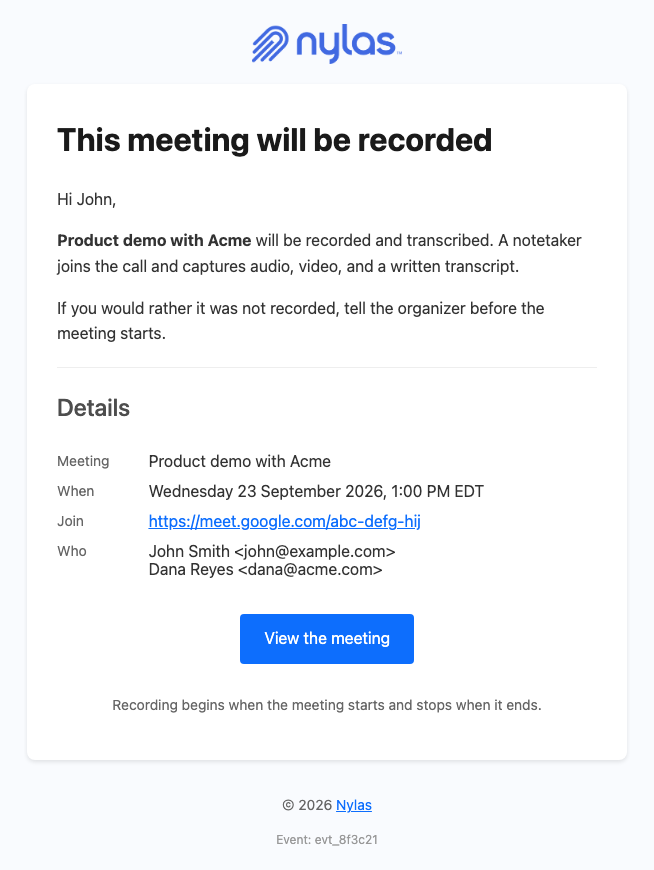
Why fire this from event.created?
Section titled “Why fire this from event.created?”Because it’s the only trigger in the chain that knows who is attending. The Notetaker triggers carry an event object containing just ical_uid, event_id, and master_event_id, with no participants and no title, so a template fired from notetaker.created has nobody to address.
event.created gives you participants, title, when, organizer, and conferencing at the payload root. That’s everything a disclosure needs. To send each attendee their own copy with recipient.email populated, set "notify_individually": "true" in the event’s metadata. Without it, Nylas sends one message to all participants.
event.created fires whether or not a Notetaker was sent to that meeting, and workflows don’t filter, so scope the workflow to the accounts where recording is always on. That’s covered next.
How do I only send this for recorded meetings?
Section titled “How do I only send this for recorded meetings?”Use a grant-level workflow on the grants where every meeting is recorded, rather than an application-level workflow across everything. An application-level event.created workflow fires for every event on every calendar the application can see, including meetings your users create by hand, so a recording notice on all of them would be wrong as well as noisy.
curl -X POST "https://api.us.nylas.com/v3/grants/$GRANT_ID/workflows" \ -H "Authorization: Bearer $NYLAS_API_KEY" -H 'Content-Type: application/json' \ -d '{ "name": "Recording notice", "trigger_event": "event.created", "template_id": "<TEMPLATE_ID>", "delay": 0, "is_enabled": true, "from": { "email": "[email protected]", "name": "Your Company" } }'If recording is a per-meeting choice rather than a per-account one, a workflow is the wrong tool. Consume the event.created webhook instead, check your own record of whether a Notetaker was invited, and send through transactional send when it was. That costs you a handler and gives you a check a workflow can’t make, because the event payload doesn’t say whether a Notetaker was invited.
Remember that grant-level workflows don’t appear in the Dashboard. Track which grants you have provisioned in your own system, because there is no interface that will tell you later.
What should the email say?
Section titled “What should the email say?”Name what’s captured, and say who to talk to. The template states audio, video, and a written transcript, because a Notetaker takes all three and attendees reading “recorded” tend to assume audio only.
Attendees can’t remove the Notetaker themselves, so point them at the organizer. The organizer’s address is in the payload as organizer.email, which makes that instruction concrete rather than generic.
Send it with delay: 0. A disclosure that arrives after the meeting has started is worthless, and events are often created minutes before they begin.
How does the template handle the payload?
Section titled “How does the template handle the payload?”Three things need care, and all three are guard problems rather than content problems.
The time depends on the kind of event. The when object takes one of three shapes, named by when.object:
when.object | Fields | Used for |
|---|---|---|
timespan | start_time, end_time, start_timezone, end_timezone | Timed meetings |
date | date | A single all-day event |
datespan | start_date, end_date | A multi-day all-day event |
Only timespan carries a Unix timestamp. formatDate throws on the date strings in date and datespan, so branch on when.object first and print the date as it arrives. The template prints only the start of a datespan, because Google and Microsoft set end_date to the day after the event ends.
For timed events, when.start_timezone comes from the event itself. Guard it anyway, because formatDate throws on a missing argument rather than defaulting.
{{#if (eq when.object "date")}} {{when.date}}, all day{{else}}{{#if (eq when.object "datespan")}} All day, starting {{when.start_date}}{{else}} {{#if when.start_timezone}} {{ formatDate when.start_time when.start_timezone "EEEE d LLLL yyyy, h:mm a ZZZZ" "en" }} {{else}} {{ formatDate when.start_time "UTC" "EEEE d LLLL yyyy, h:mm a ZZZZ" "en" }} {{/if}}{{/if}}{{/if}}The join link is three levels deep. conferencing is absent entirely on meetings without a video call, so each level needs its own guard.
{{#if conferencing}}{{#if conferencing.details}}{{#if conferencing.details.url}} <a href="{{conferencing.details.url}}">{{conferencing.details.url}}</a>{{/if}}{{/if}}{{/if}}Participants may have no name. Iterate with {{#each}} and guard the name inside the loop, so an attendee who was invited by address alone still appears.
{{#each participants}}{{#if name}}{{name}} {{/if}}<{{email}}>{{/each}}The complete template
Section titled “The complete template”This renders the email above for timed, all-day, and multi-day events, including events with no conferencing, no timezone, and unnamed participants.
<!DOCTYPE html><html lang="en" xmlns="http://www.w3.org/1999/xhtml"><head>  <meta charset="UTF-8" />  <meta name="viewport" content="width=device-width, initial-scale=1.0" />  <meta name="color-scheme" content="light only" />  <meta name="supported-color-schemes" content="light" />  <title>{{#if title}}{{title}}{{else}}Your meeting{{/if}}</title>  <link href="https://fonts.googleapis.com/css2?family=Geist:wght@400;500;600&display=swap" rel="stylesheet" />  <style>    body { margin: 0; padding: 0; background-color: #F2F2F4; }    @media only screen and (max-width: 700px) {      .wrap { width: 100% !important; }      .pad { padding-left: 24px !important; padding-right: 24px !important; }      .hero-pad { padding: 40px 16px 44px 16px !important; }      .hero-wrap { padding: 0 8px !important; }      .page-pad { padding: 12px 8px !important; }      .wrap { border-radius: 10px !important; }      .hero-pad a { white-space: normal !important; }      .headline { font-size: 28px !important; line-height: 34px !important; }    }  </style></head>
<body style="margin: 0; padding: 0; background-color: #F2F2F4;">
  <div style="display: none; max-height: 0; overflow: hidden; opacity: 0; mso-hide: all;">This meeting will be recorded and transcribed.</div>
  <table role="presentation" width="100%" cellpadding="0" cellspacing="0" border="0" bgcolor="#F2F2F4" style="background-color: #F2F2F4;">    <tr>      <td class="page-pad" align="center" style="padding: 40px 16px;">        <table role="presentation" class="wrap" width="680" cellpadding="0" cellspacing="0" border="0" bgcolor="#FFFFFF" style="width: 680px; max-width: 680px; background-color: #FFFFFF; border-collapse: separate; border-radius: 12px; overflow: hidden; border: 1px solid #E4E4E8;">
          <tr>            <td class="pad" style="padding: 32px 48px 28px 48px;">              {{!-- Replace with your own logo. --}}              <img src="https://developer.nylas.com/_images/email/nylas-logo.png" alt="Nylas" width="96" style="display: block; width: 96px; height: auto; border: 0;" />            </td>          </tr>
          <tr>            <td class="hero-wrap" style="padding: 0 12px;">              <table role="presentation" width="100%" cellpadding="0" cellspacing="0" border="0" style="border-collapse: separate; border-radius: 8px; overflow: hidden;">                <tr>            <td class="hero-pad" bgcolor="#1F1F1F" style="padding: 52px 36px 56px 36px; border-radius: 8px; background-color: #1F1F1F; background-image: radial-gradient(ellipse 55% 60% at 100% 100%, #365462 0%, rgba(31, 31, 31, 0) 70%), radial-gradient(ellipse 80% 90% at 85% 0%, #3C5EC4 0%, #293455 45%, #1F1F1F 78%);">              <h1 class="headline" style="margin: 0; font-family: Geist, Helvetica, Arial, sans-serif; font-size: 34px; line-height: 40px; font-weight: 500; letter-spacing: -0.5px; color: #FFFFFF; word-break: break-word;">{{#if title}}{{title}}{{else}}Your meeting{{/if}} will be recorded</h1>              <p style="margin: 18px 0 0 0; font-family: Geist, Helvetica, Arial, sans-serif; font-size: 17px; line-height: 26px; color: #FFFFFF; word-break: break-word;">{{#if (eq when.object "date")}}{{when.date}}, all day{{else}}{{#if (eq when.object "datespan")}}All day, starting {{when.start_date}}{{else}}{{#if when.start_timezone}}{{ formatDate when.start_time when.start_timezone "EEEE d LLLL yyyy, h:mm a ZZZZ" "en" }}{{else}}{{ formatDate when.start_time "UTC" "EEEE d LLLL yyyy, h:mm a ZZZZ" "en" }}{{/if}}{{/if}}{{/if}}</p>              <div style="margin-top: 20px; font-size: 0; line-height: 0;">{{#if conferencing}}{{#if conferencing.details}}{{#if conferencing.details.url}}<a href="{{conferencing.details.url}}" style="display: inline-block; margin: 12px 12px 0 0; padding: 14px 28px; font-family: Geist, Helvetica, Arial, sans-serif; font-size: 16px; font-weight: 500; line-height: 20px; text-decoration: none; border-radius: 999px; white-space: nowrap; background-color: #FFFFFF; color: #080817; border: 1px solid #FFFFFF;">Join the meeting</a>{{/if}}{{/if}}{{/if}}</div>            </td>                </tr>              </table>            </td>          </tr>
          <tr>            <td class="pad" style="padding: 40px 48px 0 48px; font-family: Geist, Helvetica, Arial, sans-serif; font-size: 16px; line-height: 26px; color: #1F1F1F; word-break: break-word;">              <p style="margin: 0;">{{#if recipient}}{{#if recipient.first_name}}Hi {{recipient.first_name}},{{else}}Hi,{{/if}}{{else}}Hi,{{/if}}</p>              <p style="margin: 16px 0 0 0;">A notetaker joins the call and captures audio, video, and a written transcript. Recording begins when the meeting starts and stops when it ends.</p>              <p style="margin: 16px 0 0 0;">If you would rather it was not recorded, tell the organizer before the meeting starts.</p>            </td>          </tr>
          <tr>            <td class="pad" style="padding: 24px 48px 0 48px;">              <table role="presentation" width="100%" cellpadding="0" cellspacing="0" border="0" style="table-layout: fixed;">                {{#if conferencing}}{{#if conferencing.details}}{{#if conferencing.details.url}}                <tr>                  <td valign="top" width="104" style="width: 104px; padding: 12px 0; border-bottom: 1px solid #EFEFEF; font-family: Geist, Helvetica, Arial, sans-serif; font-size: 15px; line-height: 24px; color: #5F6368;">Join</td>                  <td valign="top" style="padding: 12px 0; border-bottom: 1px solid #EFEFEF; font-family: Geist, Helvetica, Arial, sans-serif; font-size: 15px; line-height: 24px; color: #1F1F1F; word-break: break-word; overflow-wrap: anywhere;"><a href="{{conferencing.details.url}}" style="color: #0B7D72; text-decoration: underline; word-break: break-all;">{{conferencing.details.url}}</a></td>                </tr>                {{/if}}{{/if}}{{/if}}                <tr>                  <td valign="top" width="104" style="width: 104px; padding: 12px 0; border-bottom: 1px solid #EFEFEF; font-family: Geist, Helvetica, Arial, sans-serif; font-size: 15px; line-height: 24px; color: #5F6368;">Who</td>                  <td valign="top" style="padding: 12px 0; border-bottom: 1px solid #EFEFEF; font-family: Geist, Helvetica, Arial, sans-serif; font-size: 15px; line-height: 24px; color: #1F1F1F; word-break: break-word; overflow-wrap: anywhere;">{{#each participants}}{{#if name}}{{name}}{{else}}{{email}}{{/if}}{{#unless @last}}<br />{{/unless}}{{/each}}</td>                </tr>              </table>            </td>          </tr>
          <tr>            <td class="pad" style="padding: 44px 48px 48px 48px;">              <table role="presentation" width="100%" cellpadding="0" cellspacing="0" border="0">                <tr>                  <td style="border-top: 1px solid #E6E6E6; padding-top: 20px; font-family: Geist, Helvetica, Arial, sans-serif; font-size: 13px; line-height: 20px; color: #5F6368; word-break: break-all;">{{#if id}}Event {{id}}{{/if}}</td>                </tr>              </table>            </td>          </tr>
        </table>      </td>    </tr>  </table></body></html>
Render it with POST /v3/templates/render against a real payload before enabling the workflow. A compliance email that silently fails to send is worse than one that looks plain.
What’s next
Section titled “What’s next”- Tell Scheduler attendees the meeting is recorded for bookings made through Scheduler
- Email attendees when a meeting is booked for the plain confirmation on the same trigger
- Send the recording when Notetaker media is ready delivers the output afterwards
- Notetaker for how Notetaker joins meetings and what it captures