Nylas IAM controls which Nylas resources an API caller can access and what actions it can perform. Use it to issue least-privilege API keys for services, workers, and AI agents instead of sharing an application-wide key.
Configure Nylas IAM in the Nylas Dashboard, or manage principals and credentials with the public API. This page covers the Dashboard workflow.
How Nylas IAM works
Section titled “How Nylas IAM works”Nylas has two separate authentication and authorization layers:
- Provider authentication connects a user’s Google, Microsoft, IMAP, or other provider account to Nylas. The resulting grant stores that connection and its provider OAuth scopes.
- Nylas IAM authorization controls which API callers can use Nylas resources. The resource boundary and permissions assigned to each caller define this access.
Provider scopes can’t grant a caller permission that Nylas IAM denies. Likewise, Nylas IAM can’t give a caller access that the connected provider account didn’t authorize.
The IAM access model uses these objects:
| Object | Purpose |
|---|---|
| Principal | Represents an API caller and combines one resource binding with roles and direct permissions. |
| Resource binding | Limits the principal to one organization, application, workspace, or grant. |
| Role | Groups related permissions. Nylas provides system roles, and you can create custom roles. |
| Permission | Controls a specific Nylas action. You can inherit permissions from roles or assign them directly. |
| Credential | Provides an IAM API key that authenticates as its principal. |
| Audit activity | Records IAM configuration changes and allowed or denied requests made with IAM credentials. |
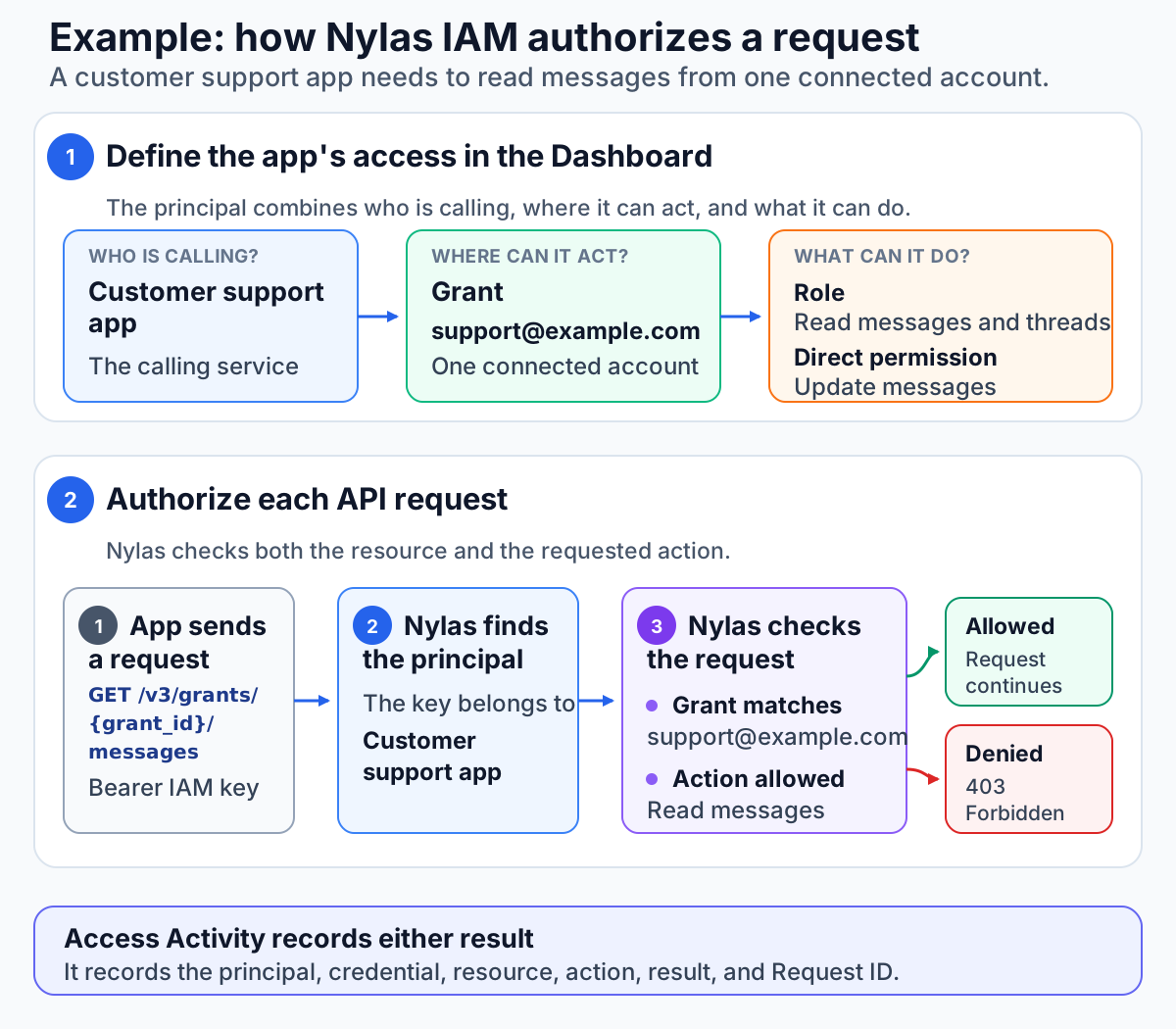
In this example, the Customer support app principal can access only the [email protected] grant. The principal inherits permission to read messages from a role. A direct permission lets it update messages. At runtime, the IAM API key identifies the principal. Nylas checks that the request targets the assigned grant and uses an approved action. If either check fails, Nylas returns 403 Forbidden. Access Activity records either result.
In the Dashboard, define a principal through Name → Resource → Access, then create one or more credentials that authenticate as that principal.
Create and configure a principal
Section titled “Create and configure a principal”A principal is an aggregation of permissions for an API caller. Create one principal for each distinct access pattern. You can issue more than one credential for a principal when callers need the same access.
- In the Dashboard, open your organization’s Nylas IAM page.
- On the Principals tab, click Create principal.
- In Name, enter a descriptive workload name. Add a description that identifies the service or agent that will use this principal, then continue to Resource.
- Choose exactly one resource binding. For Application, Workspace, or Grant, select the application before selecting the final resource.
- Continue to Access and select one or more roles, direct permissions, or both.
- Review the configuration and click Create principal.
Every principal requires exactly one resource binding:
| Binding | Access boundary | Use it for |
|---|---|---|
| Grant | One connected account, such as a mailbox or calendar. | A worker or agent that acts for one connected account. |
| Workspace | A group of grants inside one application. | A workload that serves one workspace or tenant. |
| Application | Every workspace and grant in one application. | A service that manages an entire Nylas application. |
| Organization | Organization-level actions allowed by the assigned permissions, including IAM management. | Organization-wide administration where no narrower binding works. |
A Grant binding searches all grants in the selected application by grant ID or email address. It doesn’t depend on workspace membership, so you can select grants in applications that have no workspaces, including unassigned grants.
You can edit a principal’s name, description, status, resource binding, roles, and direct permissions. Disabling a principal prevents its credentials from accessing Nylas. Deleting a principal also deletes every IAM API key attached to it, and you can’t undo the deletion.
Configure roles and permissions
Section titled “Configure roles and permissions”Roles make common access patterns reusable. On the Roles tab, choose a Nylas system role or create a custom role with the exact permissions your workload needs.
- System roles come from Nylas. You can assign them to principals but can’t edit or delete them.
- Custom roles contain the permissions you select. You can create, edit, and delete them.
- Direct permissions apply to one principal without creating a role. Use them for exceptions or narrowly tailored access.
Permissions from roles and direct assignments are additive, but the resource binding remains the outer access boundary. When a role has permissions that the selected binding doesn’t support, the Dashboard separates them into Effective permissions and Ignored permissions. Ignored permissions don’t grant access at that binding level.
Manage IAM through the API
Section titled “Manage IAM through the API”The IAM Admin system role (role_system_iam_admin) grants principal and credential CRUD permissions. IAM Auditor (role_system_iam_auditor) grants read-only access to those objects. Both require an Organization resource binding. Assign either role to a principal, then issue a key for IAM API automation.
Create and manage IAM API keys
Section titled “Create and manage IAM API keys”The Dashboard calls these credentials. An IAM API key is a credential of type api_key attached to a principal. Requests made with the key inherit the principal’s resource binding, roles, direct permissions, and status.
- On the Credentials tab, click Create key.
- Enter a descriptive name and select an active principal.
- Choose an expiration preset or a custom future date, up to 10 years ahead. Every new IAM key expires.
- Click Create and copy the secret immediately. The Dashboard displays it only once.
- Store the secret in a managed secrets service and inject it into your backend at runtime.
Use an IAM API key anywhere you use a Nylas API key. Send it as a Bearer token or pass it to a Nylas SDK:
curl --request GET \ --url "https://api.us.nylas.com/v3/grants/<NYLAS_GRANT_ID>/messages" \ --header "Authorization: Bearer <NYLAS_IAM_API_KEY>"IAM API keys differ from application API keys:
| Key type | Access model | Management location |
|---|---|---|
| IAM API key | Inherits one principal’s resource binding and permissions. | Organization Nylas IAM page |
| Application API key | Provides application-wide access to the application’s connected accounts. | Application API keys page |
Prefer IAM API keys for production workloads that don’t need application-wide access. Keep both key types out of source code, client applications, logs, prompts, and error messages.
To rotate an IAM API key without downtime, create a replacement credential for the same principal, deploy the new secret, verify that requests succeed, and then delete the old credential. You can edit a key to change its name or set its status to Disabled. A disabled or deleted key no longer authenticates and returns 401 Unauthorized.
Review and troubleshoot IAM activity
Section titled “Review and troubleshoot IAM activity”Nylas IAM retains both audit views for 400 days:
- Config Changes records changes to principals, credentials, roles, permissions, and resource bindings. Filter by event, resource type, time, principal ID, credential ID, resource ID, actor, or Request ID.
- Access Activity records allowed and denied API, authentication, and MCP requests made with IAM credentials. Filter by result, principal, API key, time, application, grant, workspace, or Request ID.
When an Access Activity event has a Request ID and application, use its request link to open the corresponding API, authentication, or MCP logs. This connects the authorization decision to the underlying request without exposing credential secrets.
Troubleshoot 401 Unauthorized
Section titled “Troubleshoot 401 Unauthorized”A 401 response means Nylas couldn’t authenticate the credential. In the Credentials tab, confirm that the IAM API key still exists and has an Active status. Also confirm that its principal is active and that the caller is sending the current secret as a Bearer token.
Because the Dashboard displays a key secret only once, create a replacement if the stored value is unavailable. Never place a key in a ticket, chat message, log, or screenshot while troubleshooting.
Troubleshoot 403 Forbidden
Section titled “Troubleshoot 403 Forbidden”A 403 response means Nylas authenticated the IAM API key but didn’t authorize the request. Open Access Activity, filter by Request ID or API key, and inspect the denial reason. Then confirm that:
- The principal’s resource binding includes the application, workspace, or grant in the request.
- The principal has an effective permission for the requested action.
- A role permission isn’t listed as ignored for the selected resource binding.
Provider OAuth scopes are a separate authorization layer. If IAM allowed the request but the provider rejected the operation, inspect the grant’s provider scopes and the provider-specific error instead.
What’s next
Section titled “What’s next”- Manage IAM principals and API keys for API workflows, expiration, and object limits
- Authentication overview for provider authentication methods and grants
- Security best practices for protecting credentials and user data
- Nylas MCP server for connecting agents with an IAM API key
- Troubleshoot Nylas API errors for common API and provider failures