The Scheduler Configuration API supports automatic Notetaker (meeting bot) integration. Notetaker is disabled by default. When enabled, bookings automatically create a Notetaker bot that joins the meeting to record, transcribe, and generate summaries and action items.
How it works
Section titled “How it works”When you enable Notetaker for a Scheduler Configuration:
- A guest books a meeting through your Scheduling Page
- The Scheduler creates the calendar event with Notetaker settings attached
- The Notetaker joins the event at the start time & conferencing location, even if the event time changes
- The Notetaker records, transcribes, and processes the meeting based on your
meeting_settings
Prerequisites
Section titled “Prerequisites”Before you can enable Notetaker for Scheduler bookings:
- Conferencing must be configured - Your Configuration must include
event_booking.conferencingwith a supported provider - Supported providers: Google Meet, Microsoft Teams, or Zoom
- Valid grant - The grant associated with your Configuration must have the necessary permissions
For more information about setting up conferencing, see Adding conferencing to bookings.
Enable Notetaker using the Scheduler API
Section titled “Enable Notetaker using the Scheduler API”To enable Notetaker, set scheduler.notetaker_settings.enabled to true when you make a Create Configuration or Update Configuration request.
When you enable Notetaker via the API, users can configure their settings in the Scheduler Editor UI.
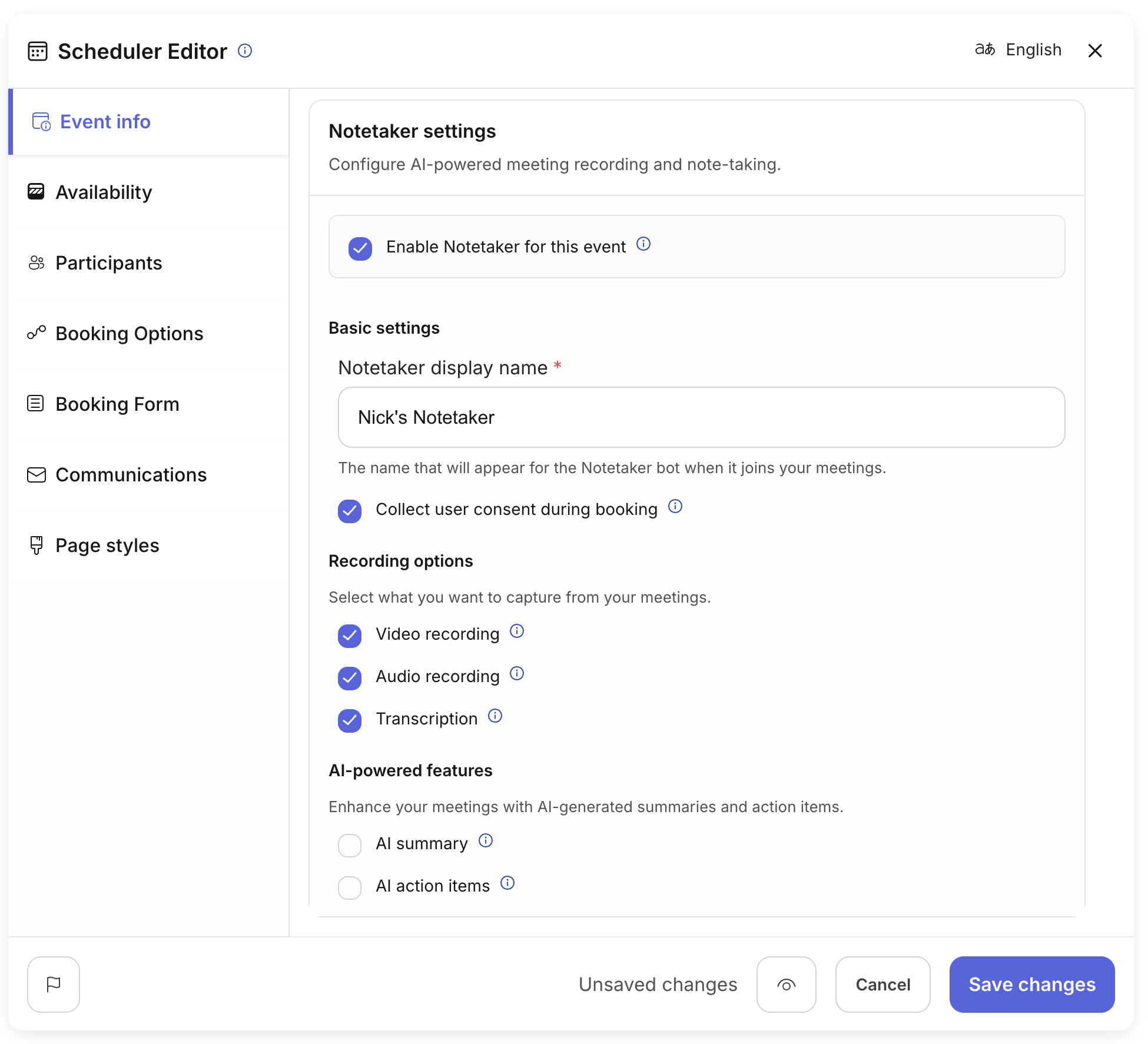
You can also set default values through the API that will be used for all bookings.
curl --request PUT \ --url "https://api.us.nylas.com/v3/grants/<NYLAS_GRANT_ID>/scheduling/configurations/<SCHEDULER_CONFIGURATION_ID>" \ --header 'Accept: application/json, application/gzip' \ --header 'Authorization: Bearer <NYLAS_API_KEY>' \ --header 'Content-Type: application/json' \ --data '{ "scheduler": { "notetaker_settings": { "enabled": true, "show_ui_consent_message": true, "notetaker_name": "Meeting Recording Bot" } } }'Configure recording and transcription settings
Section titled “Configure recording and transcription settings”You can customize what Notetaker records and generates by specifying meeting_settings:
curl --request PUT \ --url "https://api.us.nylas.com/v3/grants/<NYLAS_GRANT_ID>/scheduling/configurations/<SCHEDULER_CONFIGURATION_ID>" \ --header 'Accept: application/json, application/gzip' \ --header 'Authorization: Bearer <NYLAS_API_KEY>' \ --header 'Content-Type: application/json' \ --data '{ "scheduler": { "notetaker_settings": { "enabled": true, "meeting_settings": { "video_recording": true, "audio_recording": true, "transcription": true, "summary": true, "summary_settings": { "custom_instructions": "Focus on key decisions and next steps." }, "action_items": true, "action_items_settings": { "custom_instructions": "List the top 5 action items with owners." } } } } }'Notetaker settings reference
Section titled “Notetaker settings reference”| Field | Type | Default | Description |
|---|---|---|---|
enabled | boolean | false | When true, automatically creates a Notetaker bot for bookings. |
show_ui_consent_message | boolean | true | When true, shows a recording consent message to guests in the Scheduler UI. |
notetaker_name | string | "Nylas Notetaker" | Display name for the bot (max 255 characters). |
meeting_settings | object | — | Configuration for recording, transcription, and AI features. |
Meeting settings reference
Section titled “Meeting settings reference”| Field | Type | Default | Description |
|---|---|---|---|
video_recording | boolean | true | Records the meeting video. |
audio_recording | boolean | true | Records the meeting audio. Required for transcription. |
transcription | boolean | true | Transcribes the meeting audio. Requires audio_recording. |
summary | boolean | false | Generates an AI summary. Requires transcription. |
summary_settings.custom_instructions | string | — | Custom prompt for summary generation (max 1500 chars). |
action_items | boolean | false | Extracts action items. Requires transcription. |
action_items_settings.custom_instructions | string | — | Custom prompt for action items (max 1500 chars). |
leave_after_silence_seconds | integer | — | Bot leaves after this many seconds of silence (10-3600). |
Feature dependencies
Section titled “Feature dependencies”Some features require others to be enabled:
- transcription requires audio_recording
- summary requires transcription
- action_items requires transcription
When you enable features that depend on others, Nylas automatically enables the required features. For example, if you set summary: true, Nylas automatically enables video_recording, audio_recording, and transcription.
Consent and notifications
Section titled “Consent and notifications”The consent messaging feature is optional and doesn’t need to be configured. You can hide the consent message option by setting show_ui_consent_message to false. When show_ui_consent_message is true, the Scheduler UI displays a message to guests informing them that the meeting will be recorded. The Notetaker bot also sends a message through the meeting provider’s messaging function a few minutes after joining to inform attendees about recording.
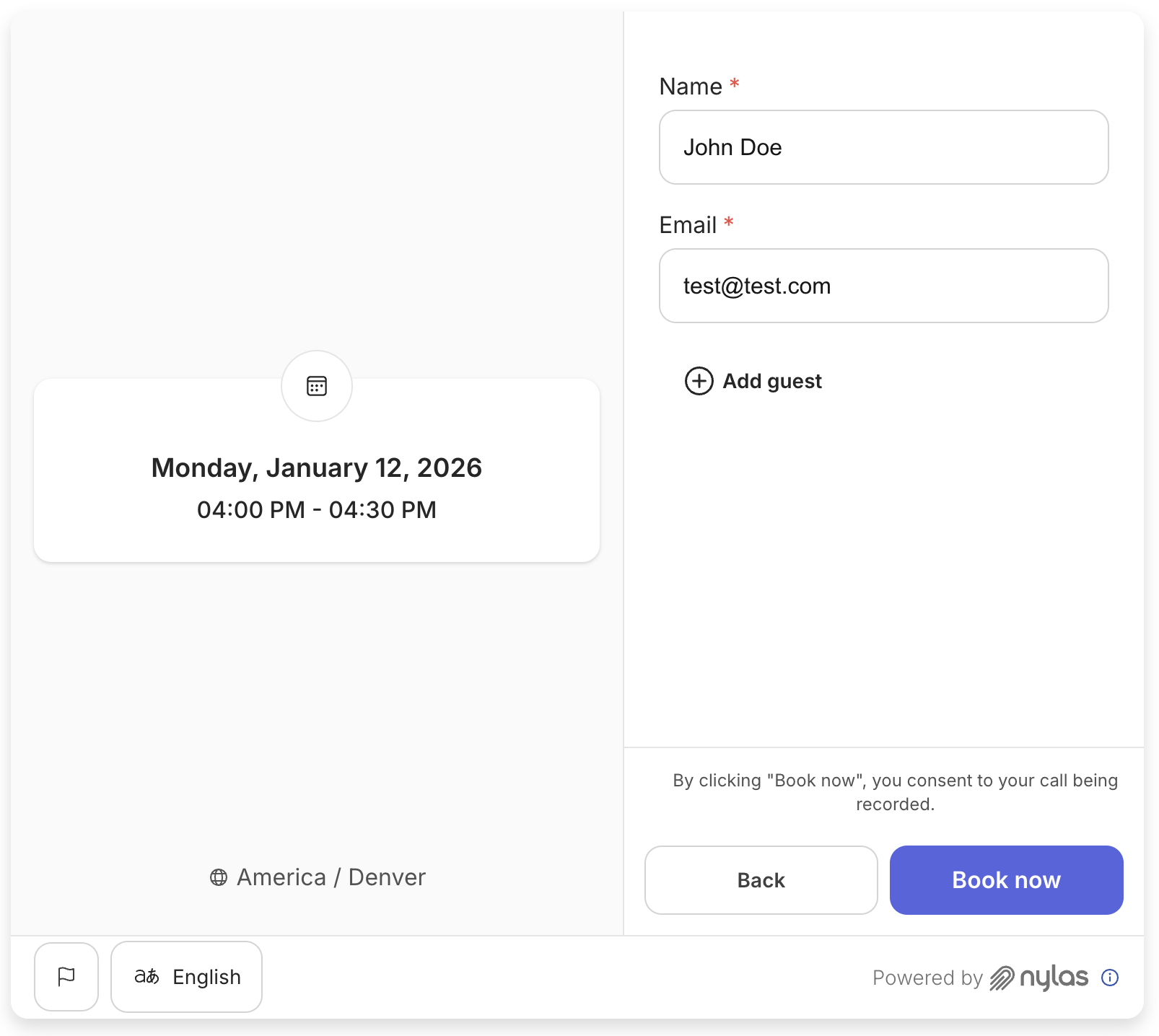
Nylas sends webhook notifications about Notetaker bots, including when they join calls and when recordings are available. For more information about handling Notetaker media files, see Handling Notetaker media files.
Keep in mind
Section titled “Keep in mind”- Notetaker integration requires conferencing to be configured for your Configuration
- The Notetaker bot joins the meeting at the scheduled start time
- Recordings and transcripts are available through webhook notifications after the meeting ends
- You can customize the bot’s display name, but it must be 255 characters or less
- Custom instructions for summaries and action items are limited to 1500 characters each
For more information about Notetaker features and capabilities, see Using Nylas Notetaker.